How to Set Up an AI Chatbot for Customer Service in One Afternoon
A four-hour plan for small teams: answers, price list, answer mode, a 30-question test, handover, schedule, launch on one channel and the morning review.
In this article
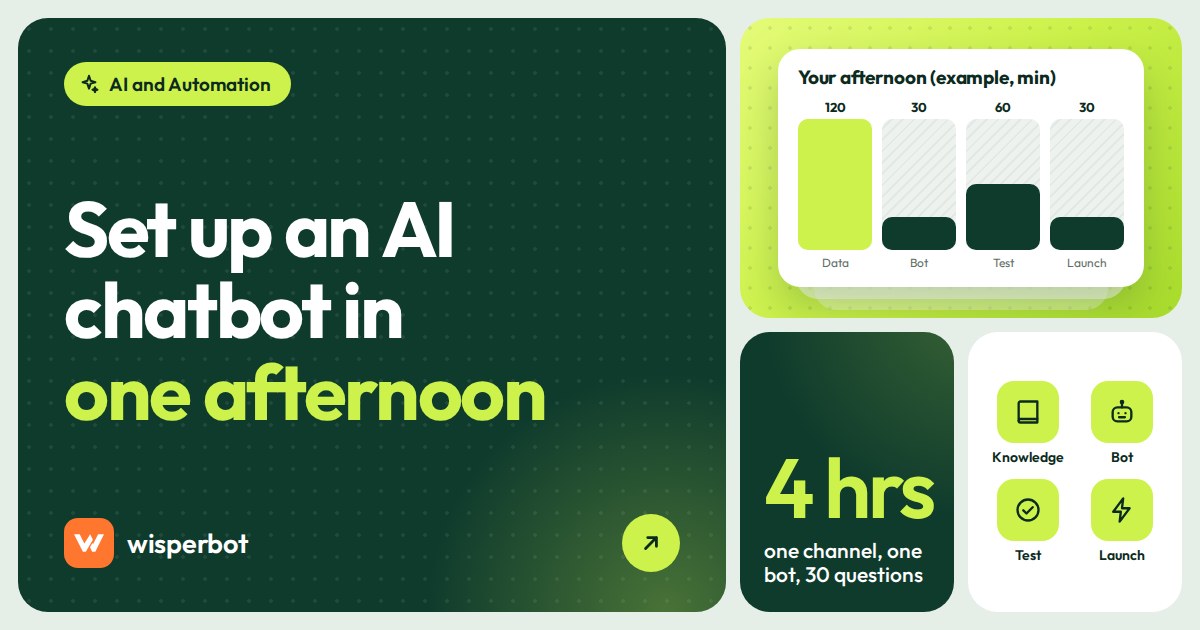
Start at 1 pm with 30 real customer questions and your price list, and by 5 pm you can have a bot answering on one channel. That's how to set up an AI chatbot for customer service without turning it into a two-month project: gather your answers, add prices, choose how freely the bot may answer, test it against those 30 questions, decide when it hands over to a person and when it's allowed to answer, then switch it on for one channel and review every conversation the next morning. We use WisperBot's screens below because we know them best, but the plan works with any tool.
Key takeaways
- Four hours is enough if you keep the scope small: one channel, one bot, your 30 most common questions.
- Most of the time goes on your information (policies, prices, delivery), not the software. A bot can't answer what you never wrote down.
- Start with a tight answer mode, test against real questions, and fix the data behind every wrong answer rather than the bot's wording.
- Launch on one channel, at the hours nobody covers today, and read every conversation the next morning.
- Keep a list of the questions the bot couldn't answer. Working through it each week is what improves the bot.
What do you need before you start?
You need 30 real customer questions copied from your inbox, a current price list as a spreadsheet, your delivery, payment and returns rules written in plain sentences, one channel to launch on and one person who will read the bot's conversations tomorrow morning. With those ready, the setup itself is the quick part.
Pick the 30 questions from the last two weeks, not from memory. Memory gives you "what are your prices?"; the inbox gives you "dam koto apu, blue ta?", "XL ache?" and "can you deliver to Gazipur by Friday?". The bot has to handle the second kind.
Choose the launch channel by pain, not size: wherever people wait longest today. For most shops we talk to in Dhaka that is WhatsApp after 10 pm, when the last person has put the phone down and the "dam koto?" messages keep coming.
How to set up an AI chatbot for customer service: the four-hour plan
Here is the afternoon, block by block. If your price list is a mess, block two will take longer. Let it; a bot reading a clean sheet is worth more than any setting on the later screens.
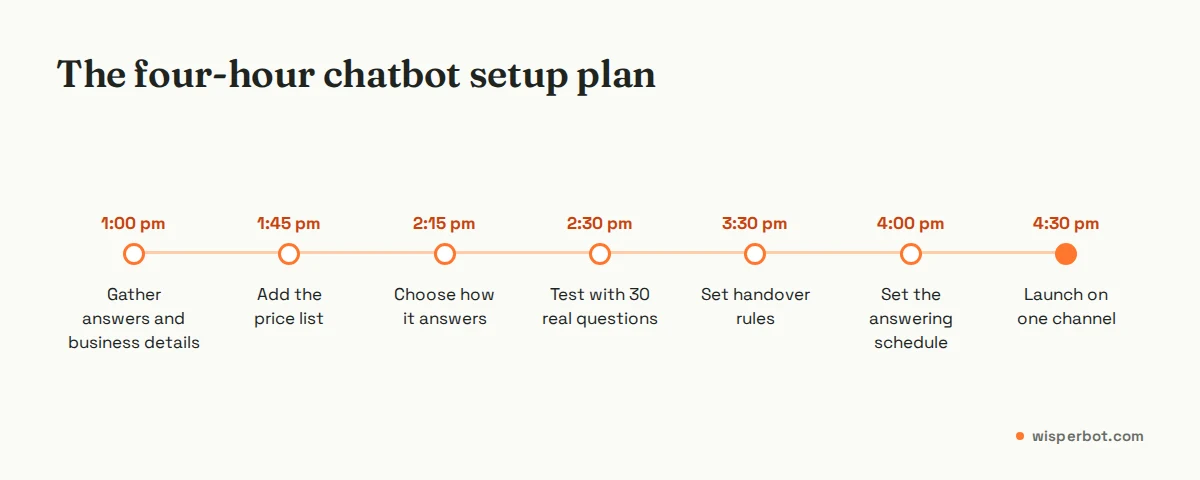
| Time | Task | What you finish with |
|---|---|---|
| 1:00 to 1:45 | Gather answers and business details | Delivery, payment, returns and opening-hours text; knowledge sources added |
| 1:45 to 2:15 | Add your price list | A clean CSV or Google Sheet the bot reads |
| 2:15 to 2:30 | Choose how it answers | Answer mode and reply length set |
| 2:30 to 3:30 | Test with 30 real questions | A marked test sheet and fixed data |
| 3:30 to 4:00 | Handover rules | Who takes over, and what the bot says meanwhile |
| 4:00 to 4:30 | Answering schedule | Hours and timezone when AI may answer |
| 4:30 to 5:00 | Launch on one channel | Bot live, team told, morning review booked |
1:00 to 1:45: gather your answers
Write down what a new staff member would need on day one: delivery areas and charges, delivery times, payment methods, the returns and exchange rule, opening hours and what happens with damaged items. Short, plain sentences. "Outside Dhaka delivery is 120 taka and takes 2 to 3 days" beats a paragraph about your commitment to service, and the bot will quote it back word for word.
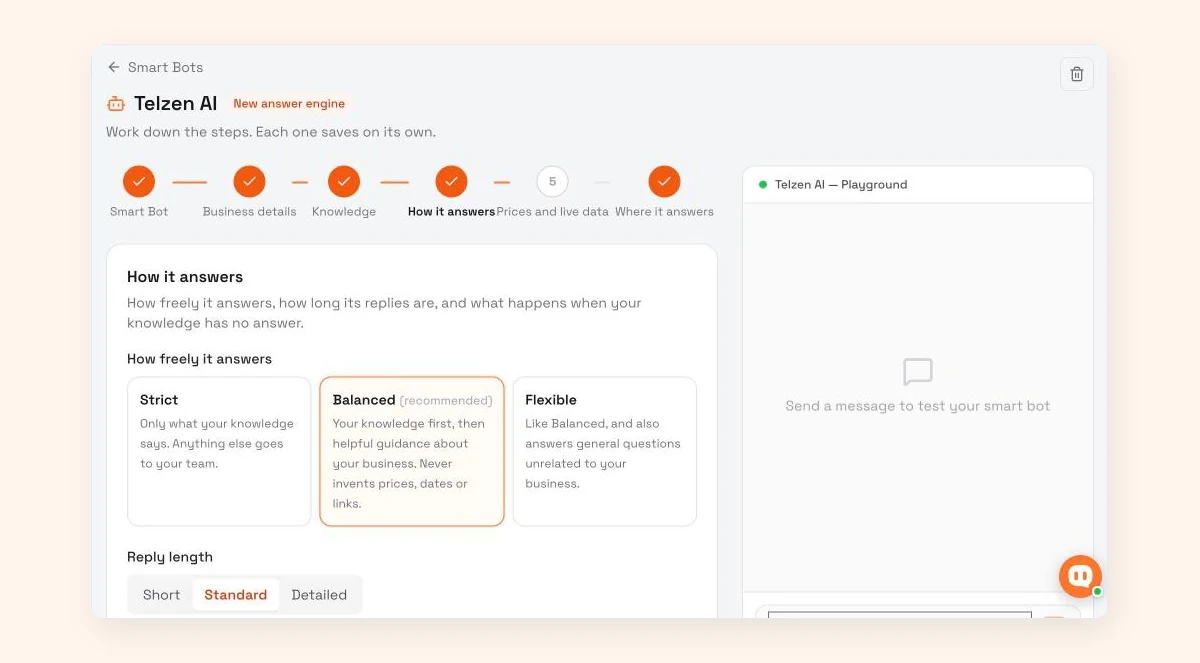
In WisperBot, the Smart Bot setup has six steps: Smart Bot, Business details, Knowledge, How it answers, Prices and live data, and Where it answers. Each step saves on its own. Business details is where your name and description go; fill them in properly, because until they're there, Balanced mode behaves like Strict. Knowledge takes websites, pages, files, text and Q&A. If you have an FAQ document and a website that disagree, mark the one you trust as the official source, and the bot follows it when sources conflict.
1:45 to 2:15: add the price list
Prices change too often to live in a paragraph of knowledge. Put them in a spreadsheet with one row per product variant: name, size or colour, price, and stock if you track it. In WisperBot's Prices and live data step you add a price list as a CSV file or a Google Sheet link. The app asks for "a CSV with a header row, up to 2 MB and 5,000 rows", and from Excel you use Save as, then CSV. You can also connect an online store or set up read-only lookups into your own system. Our guide to writing a price list your chatbot can use has a template.
2:15 to 2:30: choose how it answers
This is a 15-minute decision that shapes everything. WisperBot's "How it answers" step offers three modes. Strict: "Only what your knowledge says. Anything else goes to your team." Balanced, which the app marks as recommended: "Your knowledge first, then helpful guidance about your business. Never invents prices, dates or links." Flexible: "Like Balanced, and also answers general questions unrelated to your business."
For a first launch we'd pick Strict, then move to Balanced after a week of clean answers. Set reply length to Short (about 40 words) or Standard (about 70) for chat; Detailed (about 140) suits email better than WhatsApp. If you're a clinic or anything regulated, turn on "Use Knowledge Base wording exactly". Our post on Strict, Balanced and Flexible modes covers the trade-offs.
2:30 to 3:30: test with 30 real questions
Send each of your 30 questions to the bot, using the test panel beside the setup steps or a personal account on the channel, and mark every answer as right, wrong or handed over. Include at least five the bot should not answer: a refund demand, a complaint, a question about a product you don't sell. You want those handed over, not improvised.
When an answer is wrong, fix the source, not the symptom. A wrong price is almost always a missing variant row or two products with similar names. A vague delivery answer means the delivery text is vague. Re-test the ones you fixed. Aim for every price and policy answer right before launch; a handover is fine, a wrong answer isn't.
Be realistic about very short messages. A lone "?" under a photo carries too little to answer, and it may go to a person. That's the right behaviour.
3:30 to 4:00: set the handover rules
Decide three things: who gets conversations the bot hands over, how fast they'll reply, and what the bot says in the meantime. Write the waiting line in your business details, in the language your customers use: "I'll pass this to our team. They're online from 10 am. Could you share your order number?"
In WisperBot every conversation has an AI/Human switch, so a teammate can take over any chat, then assign it, set a status, add labels and leave internal notes. Keep refunds and complaints with people from day one. Our AI-to-human handoff playbook goes further.
4:00 to 4:30: set when the AI answers
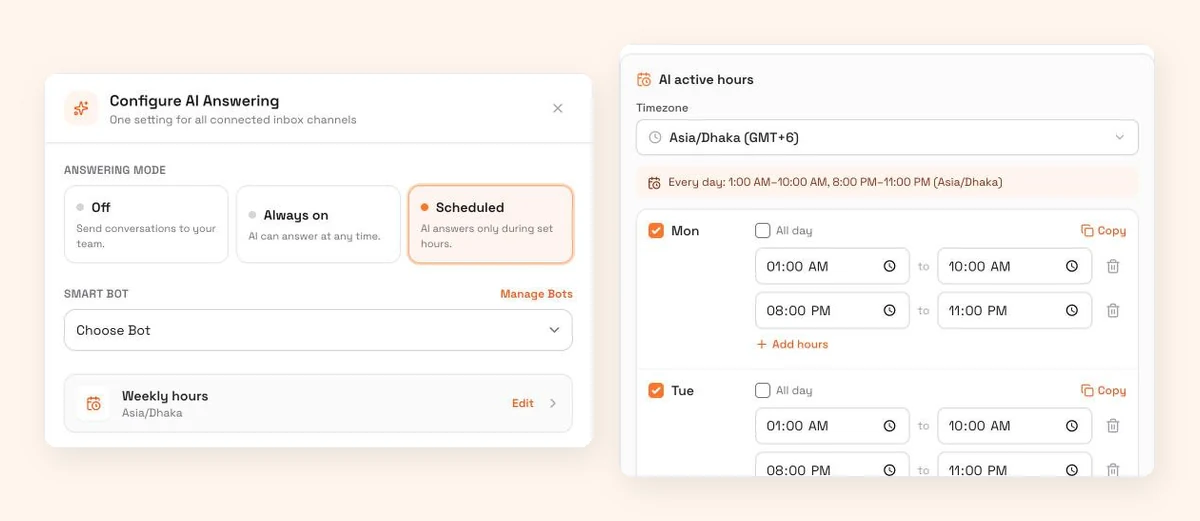
Don't switch the bot on for the whole day in week one. Cover the hours nobody covers now, usually late night to mid-morning. In WisperBot, AI Answering for the inbox has three modes: Off ("Send conversations to your team."), Always on ("AI can answer at any time.") and Scheduled ("AI answers only during set hours."). Choose Scheduled and your Smart Bot, pick a timezone, then tick each day and give it one or more time windows. Add hours adds a second window, and Copy repeats a day's hours on other days. The AI only answers on the days you tick.
4:30 to 5:00: launch on one channel
Website chat has its own switch, "Let a Smart Bot answer first", set to Permanent or Scheduled. The inbox is different: in WisperBot one AI Answering setting covers all your connected inbox channels (WhatsApp, Messenger, Instagram) together, and email has its own. So for a true one-channel launch, either start on website chat, or connect only the channel you're launching on and add the others after the first week. Tell the team it's live. Then go home.
The next-morning review
This is the step that decides whether the bot gets better or gets switched off. Give it 20 minutes before you start replying to new messages.
- Reply first to every conversation the bot handed over. Those customers were promised a person.
- Read every answer the bot sent overnight, as well as the handovers. Mark anything wrong.
- Open the Unanswered questions panel in the Knowledge step. It lists "questions customers asked that this Knowledge Base could not answer, most asked first". Write an answer for each one that deserves it, or dismiss it.
- Fix the data behind every wrong answer: a price row, a policy sentence, a delivery area.
- Note one thing to change in tomorrow's setup, such as a longer window or a new knowledge source. One thing, not five.
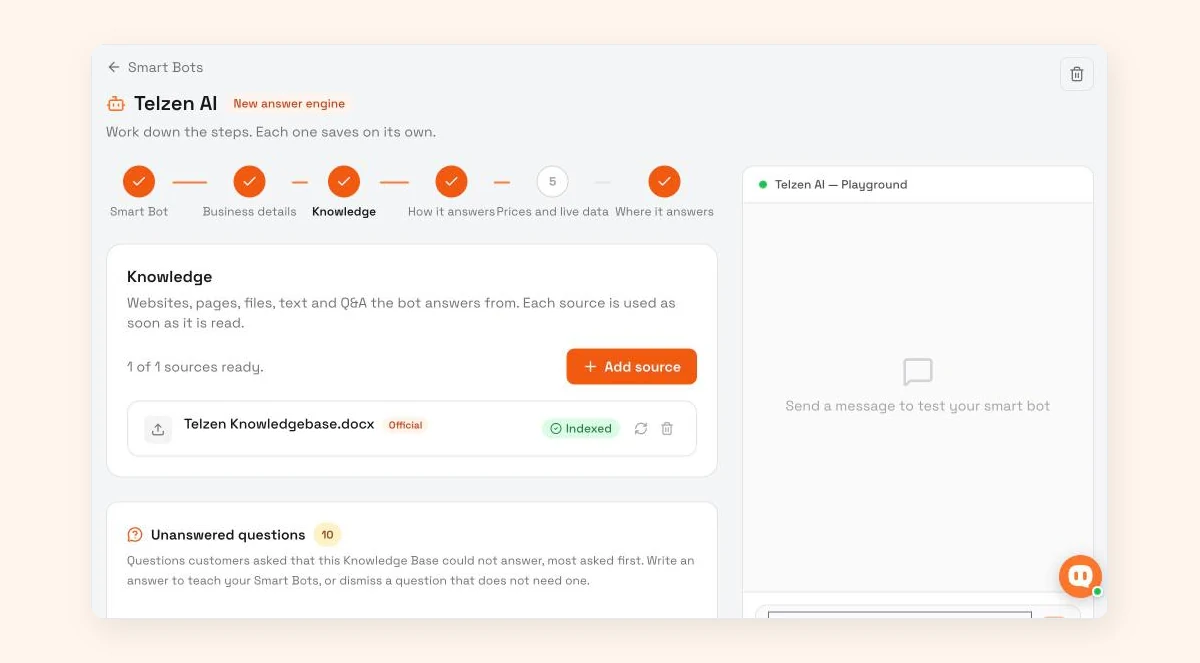
Questions the bot answered wrongly, or handed over for other reasons, won't appear in that panel, so the read-through still matters. After the first week, move to a weekly routine; our 20-minute weekly review of unanswered questions lays it out.
What mistakes should you avoid in the first week?
The common ones: switching the bot on for every channel and every hour at once, testing with made-up questions, fixing a wrong answer by rewording instead of fixing the data, starting in the loosest answer mode, and skipping the morning read-through. Each one makes the bot look worse than it is.
One more: forgetting the costs that sit outside the bot. On WhatsApp, Meta gives each number 1,000 free service messages a month, and since 1 October 2026 it charges replies beyond that at the market's utility rate. Instagram and Messenger replies have no per-message fee from Meta. Check what your channel costs before you widen the hours.
Is AI chatbot setup for small businesses worth it?
For most small businesses that get the same questions every day, yes, provided someone owns the weekly review. A bot that answers price and delivery questions at 1 am from your own list beats silence. If you get a handful of messages a day and answer them all within the hour, saved replies may be all you need.
Where WisperBot fits
WisperBot, a reply-first inbox for WhatsApp, Instagram, Messenger, Telegram, website chat and email, follows the plan above step for step: the six-step Smart Bot setup, three answer modes, a price list from CSV or Google Sheet, Scheduled AI answering with time windows, and the Unanswered questions panel. The bot replies in the customer's language, including mixed scripts such as Roman Bangla. The Free plan includes 100 AI replies a month on one WhatsApp number plus website chat, enough for a first test. See pricing.
Frequently asked questions
How long does it take to set up an AI chatbot for customer service?
For a small business, an afternoon of about four hours is enough to launch on one channel, if you have your price list and policies ready. Most of that time goes on writing down answers and testing against real questions. Expect another two or three weeks of short daily or weekly reviews before it's answering well.
How much does an AI chatbot for customer service cost for a small business?
It depends on volume. In WisperBot each answer the bot sends counts as one AI reply, and a typical conversation needs a few (our estimate: 2 to 4). Plans run from Free with 100 AI replies a month to Starter at $15 for 750 and Growth at $39 for 3,000. Meta's WhatsApp fees, where they apply, are separate.
Which answer mode should a new customer service chatbot use?
Start with the tightest mode your tool offers. In WisperBot that's Strict, which answers only from your knowledge and sends everything else to your team. The app marks Balanced as recommended, and it's a good next step once a week of answers has been consistently right and your business details are complete.
Can a customer service chatbot reply in Bangla, Hindi or Arabic?
Many can. WisperBot's Smart Bot replies in the customer's language, including mixed scripts like Roman Bangla. Test it with real messages in the way your customers type, because very short messages with few keywords can still go to a person, and spelling varies more than you'd expect.
Will an AI chatbot replace my customer service staff?
Not in a small business, and it shouldn't. A good customer service chatbot takes the repeated price, stock and delivery questions, especially at night, so your team spends its time on complaints, refunds and sales that need judgement. Plan for the bot to hand conversations over, not to close them all.
Sources
- Meta for Developers: WhatsApp pricing (1,000 free service messages per number per month, charged from 1 October 2026), checked 12 October 2026
- Meta for Developers: Send a message (24-hour standard messaging window for Messenger and Instagram), checked 12 October 2026
- WisperBot pricing, checked 12 October 2026
Last checked: 12 October 2026.