Instagram DM Automation: What Meta Allows and How to Start for Free
What Meta allows in Instagram DM automation, what gets accounts restricted, and how to start for free before paying for a tool.
In this article
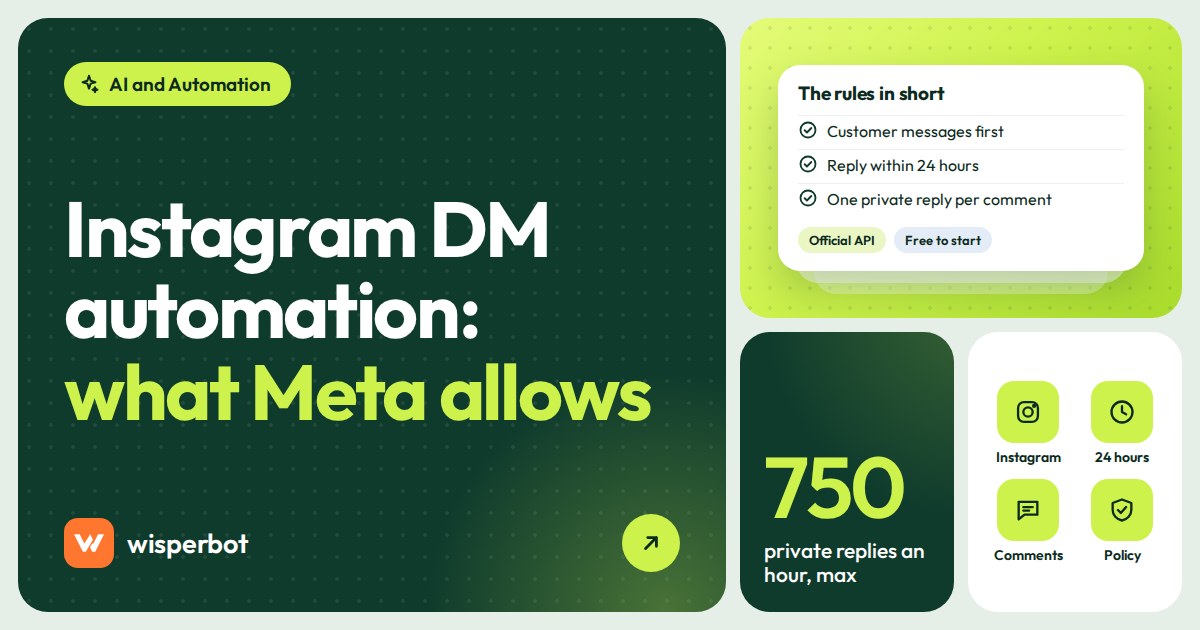
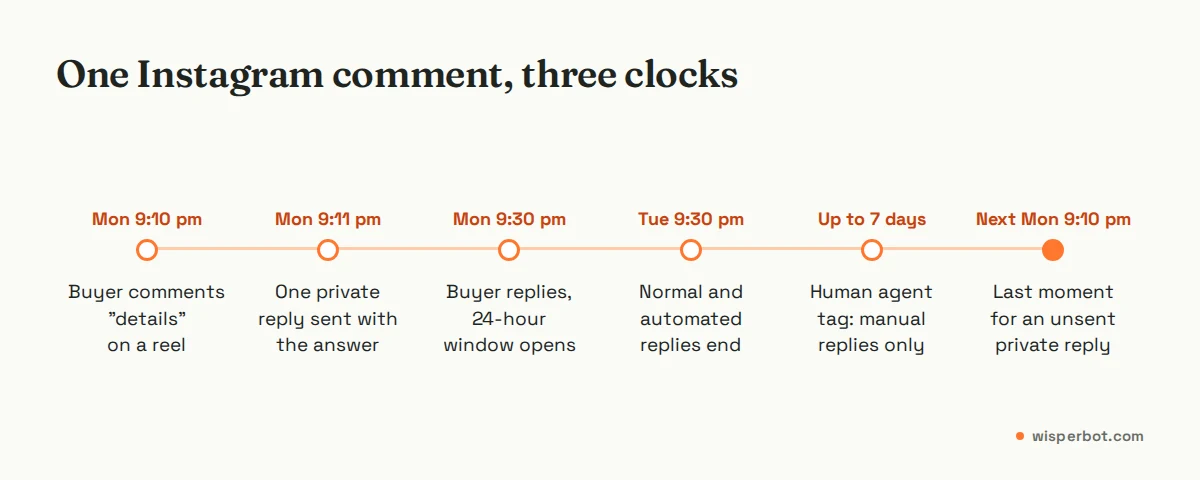
Someone comments "details" under your reel at 9:10 pm, and Meta gives you seven days to send them one private message. They will not wait seven days. Instagram DM automation is allowed, as long as it runs through Meta's official messaging API on a professional account: the customer has to message or comment first, you have 24 hours to reply to a DM, and a comment gets one private reply within 7 days. You can start for free with Instagram's own saved replies and FAQs, then move to a paid tool when the volume or the questions outgrow them.
Key takeaways
- Automated Instagram DMs are allowed through Meta's official API, for professional accounts only, and only after the customer has messaged or commented first.
- You have 24 hours to reply to a DM. A human agent tag allows manual replies after that; Meta describes it as a 7-day window.
- Comment-to-DM uses private replies: one message per commenter, sent within 7 days, and limited to 750 replies an hour per account.
- Free starting points: saved replies and FAQs in the Instagram app, and the free tiers of approved tools.
- Tools that log in with your password or send cold DMs are what put accounts at risk.
Is Instagram DM automation allowed?
Yes, if it goes through Meta's official Instagram messaging API. That API works with professional accounts, requires the business to have permission to manage messages, and only lets you message people who have contacted you first. Automation that logs in with your password, scrapes followers or sends unsolicited DMs falls outside those rules and can get an account restricted.
The difference is easy to spot when you connect a tool. An approved tool sends you to a Facebook or Instagram login screen that asks you to grant permissions to an app. A risky one asks for your Instagram password in its own form, or offers to "DM all your followers". Instagram's Terms of Use don't allow collecting information or creating accounts in an automated way without Meta's permission, and Meta's messaging rules have no room for cold outreach.
The thing to ask a vendor, then, is not whether automation is allowed but whether their tool uses the front door. Every tool we mention in our comparison of ManyChat alternatives for Instagram connects through Meta's API.
Meta's rules for Instagram automated messages
These are the limits every Instagram DM automation tool works within, from Meta's developer documentation as checked on 12 October 2026. A vendor's marketing page can't change any of them.
| Rule | What Meta's documentation says | What it means for your shop |
|---|---|---|
| Account type | The messaging API is for Instagram professional accounts | Switch a personal account to business or creator before connecting any tool |
| Who starts | Conversations "only begin when an Instagram user sends a message" to the account | No automated first messages to followers or lists |
| Reply window | 24 hours to respond to a user's message | Night messages answered the next morning are fine; a reply after a weekend away may not be |
| Human agent tag | Manual replies outside 24 hours; Meta describes it as a 7-day period | For a person answering late, not for automated promotions |
| Private replies to comments | Within 7 days of the comment; one message until the person replies | "Check inbox" a week later is too late, and a second nudge isn't allowed |
| Ice breakers | Up to 4 questions shown to start a conversation | Pick your four most common questions |
| Rate limits | 750 private-reply calls an hour per account for post and reel comments | A viral post can't all be answered in the first hour |
| Message size | Text up to 1,000 bytes | Keep automated replies short; non-Latin scripts use more bytes per character |
Two of these trip up sellers most often. The first is the 24-hour window. If a customer asks "XL ache?" at 11:40 pm on Friday and nobody reads it until Monday, the normal window has closed; only a person using the human agent tag can still answer. Our explainer on the 24-hour messaging window compares Instagram with WhatsApp and Messenger.
The second is the one private reply. Meta lets the business send one message to a commenter, and a follow-up only after they answer. So that one message has to do two jobs: give the answer and ask a question back ("It's 1,450 taka, sizes M to XL. Which size do you wear?"). A bare "check your inbox" wastes it. Our guide to replying to comments without losing buyers has more on getting that message right.
What gets Instagram accounts restricted?
In our experience the trouble comes from the method, not from automation itself. Tools that log in with your password, mass DMs to people who never contacted you, identical messages fired at hundreds of commenters and misusing the human agent tag for promotions are the patterns that cause problems. Meta's policy says misusing message tags may lead to restrictions on sending messages.
A few specific things to avoid:
- Password-sharing apps. If a tool asks for your Instagram password instead of sending you through Meta's login, don't connect it.
- Follow, like and DM bots. Growth tools that act like a person (following, liking, sending first DMs) are outside the messaging API altogether.
- Promotions dressed as human agent replies. The tag is for a person answering late, not a Monday sale blast to everyone who messaged last week.
- Two tools replying at once. Not a rule breach, but customers who get two different answers report you as spam more readily than you'd think.
Meta doesn't publish thresholds for spam detection, so we won't invent one. A message the person asked for is safe. A message they didn't ask for is the risk, however small the volume.
How to start Instagram DM automation for free
You don't need to pay anything to automate the most repetitive part of your Instagram inbox. Start with what Instagram gives you and add a free tool tier only when you need comment-to-DM.
- Switch to a professional account. Business or creator, from your Instagram settings. Nothing else works without it.
- Set up saved replies. Instagram's help centre explains how: hold a message you've sent, tap More, then Save, and give it a keyboard shortcut. Type the shortcut later to fill in the reply. Write one for price, delivery charge, payment methods and your return policy. We'd write the delivery one first; it's the question that lands at 11 pm when nobody is there to type.
- Add frequently asked questions to chats. Instagram lets you set up frequently asked questions in chats with automated responses, which you can add, edit or delete at any time. Use your top four questions.
- Check the automated responses in Meta Business Suite. If your Instagram account is linked to a Facebook Page, the Business Suite inbox has its own automated responses, such as instant replies when someone messages for the first time.
- Add a free tier only for comments. As listed on 12 October 2026, CreatorFlow's Free plan includes comment-to-DM with 500 DMs a month, and LinkDM's Free plan allows 1,000 DMs a month for DMs and stories.
- Read every automated conversation for a week. Ten minutes each evening is enough. Fix the reply text before you add more automation.
Our list of Instagram auto reply message examples has wording you can paste straight into saved replies and FAQs.
What can free Instagram DM automation not do?
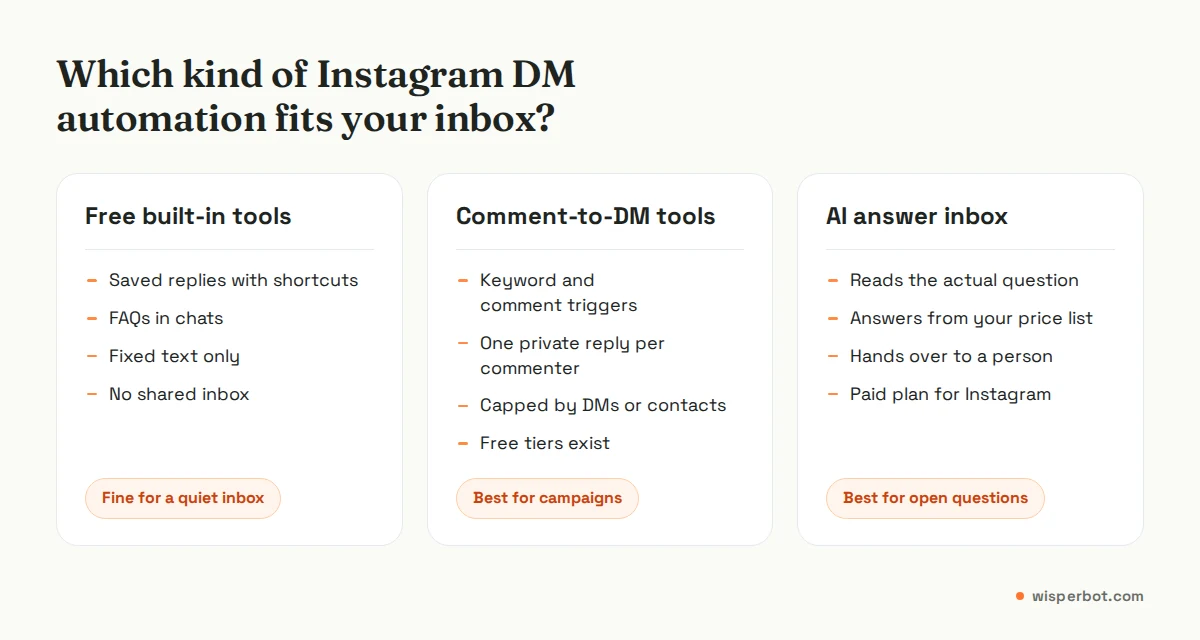
Free built-in tools send fixed text. They can't read "eta ki 38 size e ache? Dhanmondi delivery koto din?" and answer both parts from your stock and delivery list. Free tool tiers also cap DMs or contacts, and a giveaway can use up a month's allowance in an afternoon. Neither gives a small team a shared inbox.
When does a paid Instagram DM automation tool make sense?
Pay when one of three things is true: comments and DMs arrive faster than a person can answer, most questions are about prices, stock and delivery that change weekly, or more than one person needs to share the inbox. Below that, saved replies and FAQs cost nothing and do the job well enough.
The kind of tool matters more than the brand, and most people shop for the brand first. Comment-to-DM tools suit campaigns: "comment SIZE for the chart". AI answer tools suit open questions, because they read the message and reply from your own information. Example: a modest shop in Uttara getting 40 DMs a day, mostly "dam koto?" and "available?", gets more from an AI answer inbox than from a comment campaign tool. A creator running weekly giveaways with 2,000 comments needs the opposite.
Illustrative examples.
One more cost to remember: Meta charges no per-message fee for Instagram replies, unlike WhatsApp, where Meta gives each number 1,000 free service messages a month and has charged the rest at the utility rate since 1 October 2026. On Instagram, your only automation cost is the tool.
Where WisperBot fits
WisperBot, a reply-first inbox for WhatsApp, Instagram, Messenger and website chat, is for the "open questions" kind of Instagram inbox. Its Smart Bot answers DMs in seconds from your business details and price list, in the customer's language, and hands over to a person with a per-conversation AI/Human switch. Very short messages like a lone "?" may still go to a person. Instagram comes with the Starter plan at $15 a month; comment replies for customer accounts are still waiting on Meta App Review, so it isn't a comment-to-DM tool yet. See pricing.
Frequently asked questions
Is Instagram DM automation free?
It can be. Saved replies and frequently asked questions in chats are free in the Instagram app for professional accounts, and several approved tools have free tiers. As listed on 12 October 2026, CreatorFlow's Free plan includes 500 DMs a month and LinkDM's includes 1,000. Meta itself charges no per-message fee for Instagram DMs.
Can I send automated DMs to new followers on Instagram?
Not unless they message you first. Meta's messaging API only lets a business reply to people who started the conversation, by sending a DM, replying to a story or commenting on your content. Tools offering to DM every new follower automatically are working outside the official API, which puts your account at risk.
How long do I have to reply to an Instagram DM?
Meta gives businesses 24 hours to reply to a customer's message through the API. After that, a person can still reply using the human agent tag, which Meta describes as allowing manual replies within 7 days. Automated or promotional messages outside the 24-hour window are not allowed.
How many automated DMs can Instagram send per hour?
For private replies to post and reel comments, Meta's rate limit is 750 calls per hour per Instagram professional account. Ordinary text replies inside conversations have a far higher limit, 300 calls a second. In practice the private-reply cap is the one a busy giveaway will hit.
Do I need a Facebook Page to automate Instagram DMs?
Not always. Meta's Instagram API with Instagram Login lets a professional account connect to an app without a linked Facebook Page. Some tools still use the older Facebook Login route, which needs a Page, so check what your chosen tool asks for before you start.
Sources
- Meta for Developers: Instagram Messaging API (professional accounts, who starts, 24 hours, human agent, message size), checked 12 October 2026
- Meta for Developers: Instagram Platform overview (Instagram Login vs Facebook Login), checked 12 October 2026
- Meta for Developers: Instagram private replies, checked 12 October 2026
- Meta for Developers: Instagram ice breakers, checked 12 October 2026
- Meta for Developers: Messenger Platform and Instagram rate limits, checked 12 October 2026
- Meta for Developers: Send a message (standard messaging window, Human Agent tag), checked 12 October 2026
- Meta for Developers: Messenger Platform and Instagram Messaging API policy overview, checked 12 October 2026
- Instagram Help Center: saved replies and Set up frequently asked questions on chats
- Instagram Terms of Use
- Meta for Developers: WhatsApp pricing (service messages, 1,000 free per number per month), checked 12 October 2026
- CreatorFlow pricing and LinkDM pricing, as listed on 12 October 2026
Last checked: 12 October 2026.