Skip to content
Your night shift

Answer every customer in seconds.On every channel.

WisperBot replies from your own knowledge on WhatsApp, Instagram, Messenger, email and your website, then hands the conversation to your team when a person is needed.

  • Free plan. No credit card.
  • 100 AI credits every month
  • Customizable website chat
One inbox

8+ channels. One reply team.

  • Messenger
  • Instagram
  • WhatsApp
  • Website chat
  • Telegram
  • Email
  • eBayeBay
  • amazonAmazon
See every integration
The whole customer conversation

A lot less switching. A lot more connecting.

One workspace for conversations, AI, automations and publishing. This is the real product, with demo data.

Omni Inbox

A clear home for every customer conversation.

Read the context, take ownership, and keep the reply moving. Your channels and your team, working together.

Take a closer look
WisperBot Omni Inbox screen with demo data
How it works

Shop’s closed. Customers aren’t.

Your Smart Bot learns your business, answers the questions it can, and leaves your team the ones that need a person.

  1. 1

    11:47 PM

    14 messages waiting.

    Questions arrive on Messenger, Instagram, WhatsApp and your website while the shop is closed.

  2. 2

    Seconds later

    WisperBot replies.

    Answers come from your own knowledge base: prices, stock, hours and policies, in your brand’s voice.

  3. 3

    Next morning

    Your team picks up.

    Anything that needs a person waits in one shared inbox, with the full conversation and a clear owner.

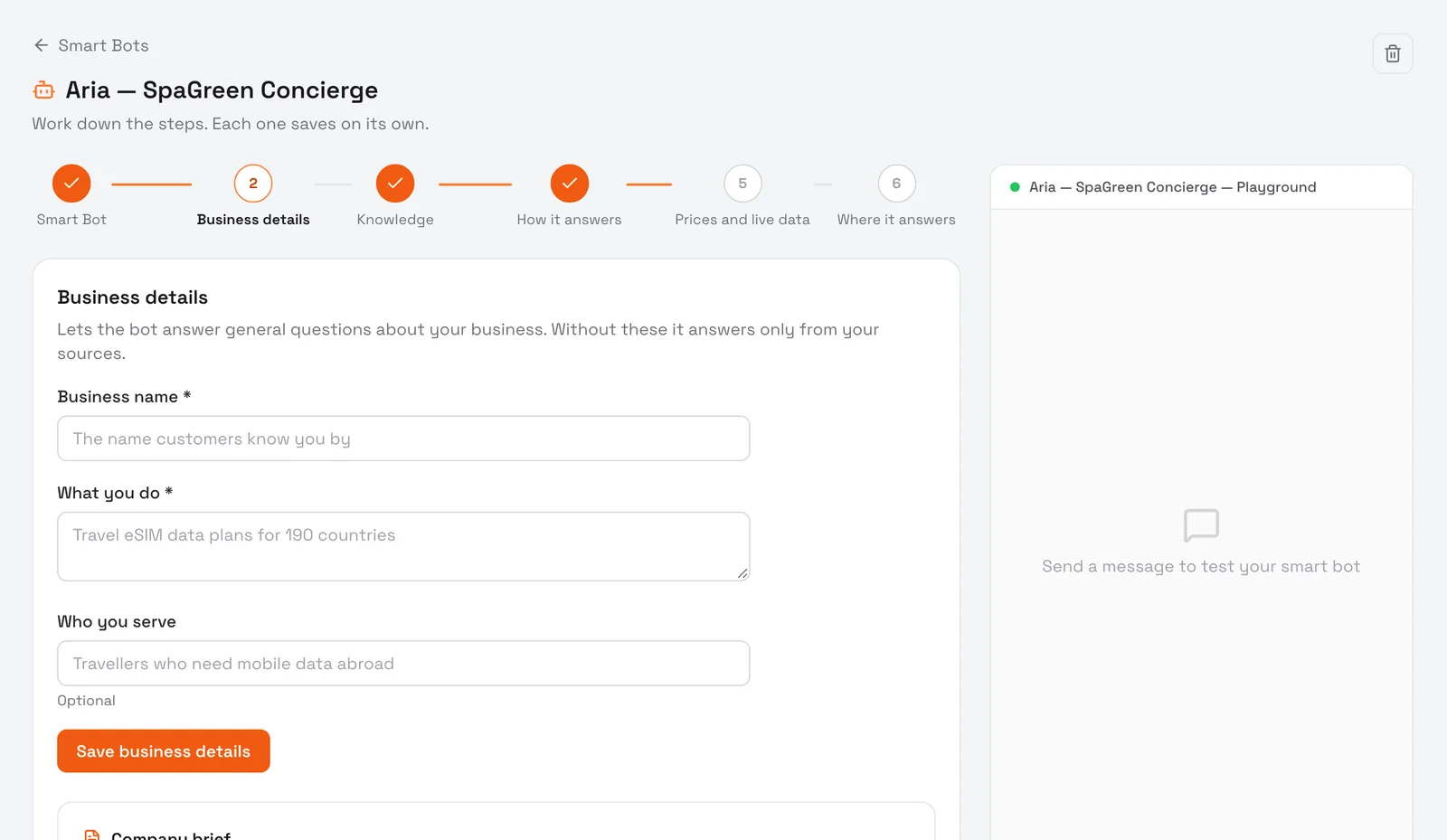
Meet your Smart AI Agent

An answer that knows where it came from.

Turn your website and documents into useful customer support. Your Smart Bot works with the knowledge you give it, asks follow-up questions, and brings in a person when needed.

  • Train on your business Knowledge Base
  • Guide the conversation with dynamic reply choices
  • Set answering hours, scope, and fallback behavior
Get to know your AI teammate
The Smart Bot setup in WisperBot: six guided steps beside a test playground
A calmer place to work

Different channels. The same sense of clarity.

A focused place for instant conversations, and a dedicated space for email. Your team gets the right tools for both.

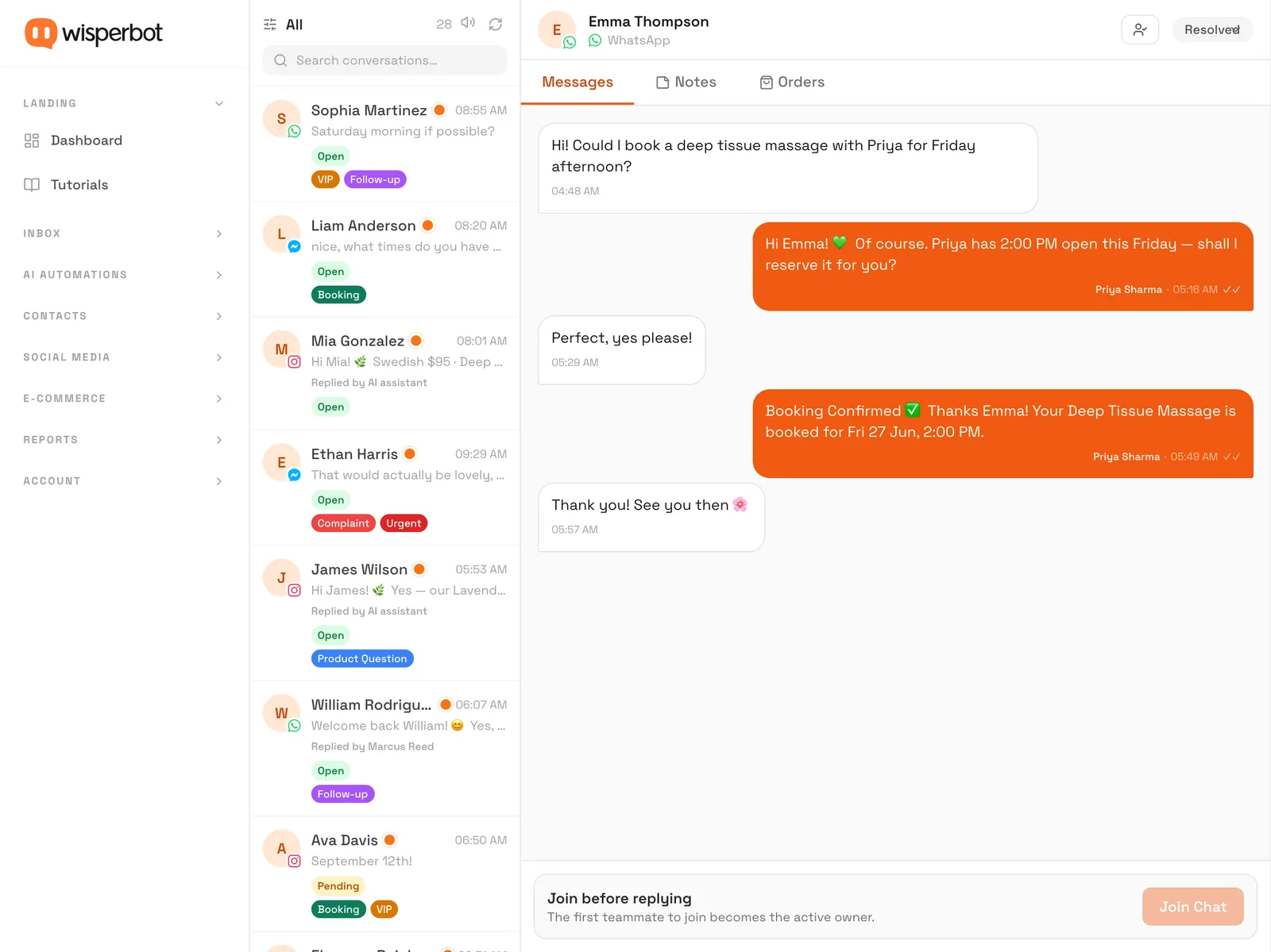
One team. One Omni Inbox.

Customer context, team ownership, notes, and replies. Keep the conversation moving without losing the thread.

Explore Omni Inbox
The WisperBot Omni Inbox with a WhatsApp booking conversation (demo data)

Email, with room to breathe.

Connect Gmail, Microsoft, and IMAP mailboxes. Read and reply in Email MasterBox, built around the way email works.

Explore Email MasterBox
For your team

AI when it helps. People when it matters.

Join a chat, take it over from the bot, or hand it to a teammate. Everyone sees the same thread, notes and customer details.

  • Clear owner for every conversation
  • Private notes and saved replies
  • Answering hours for the bot and your team
See the team inbox
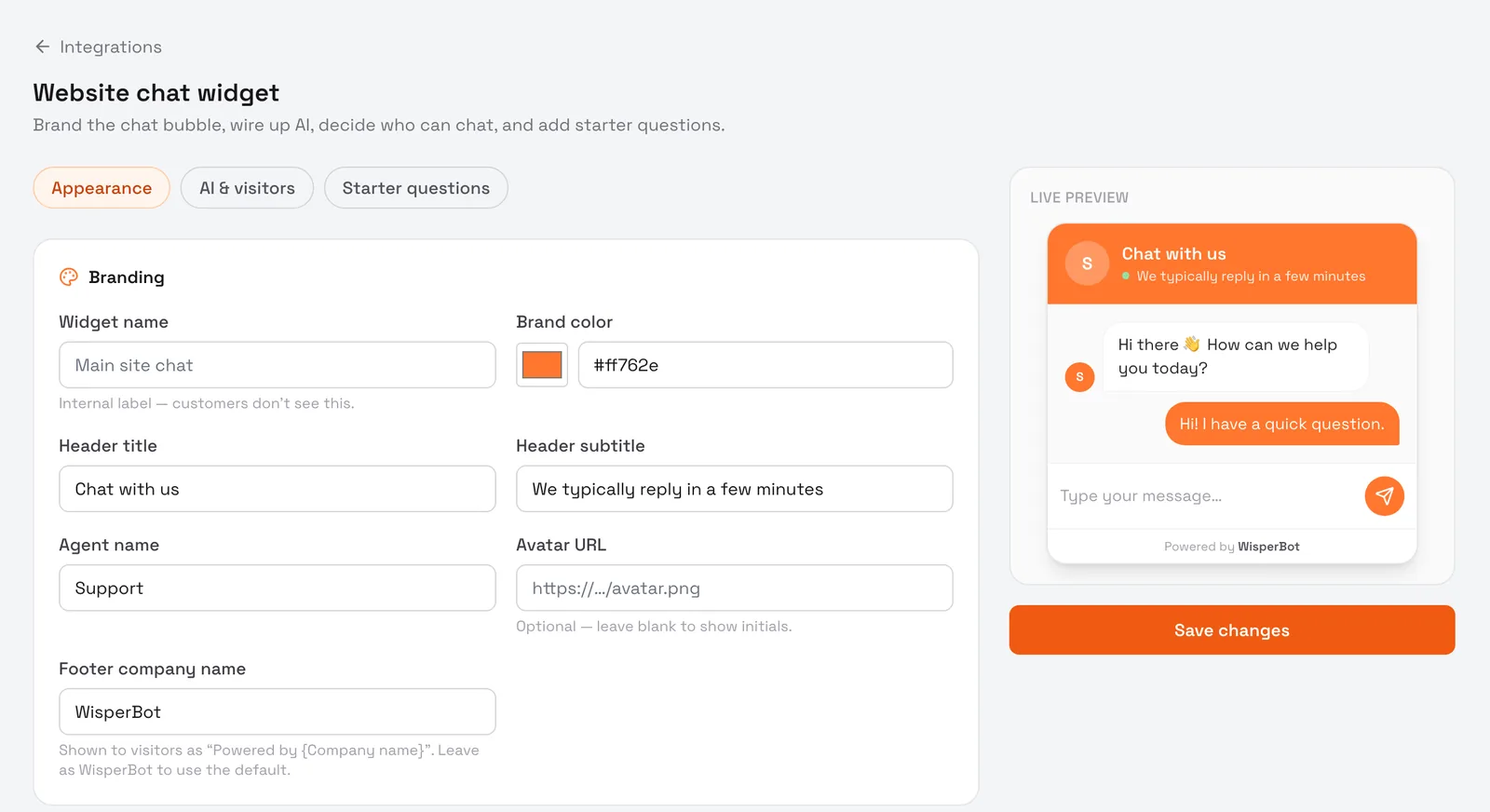
The website chat designer in WisperBot with a live preview of the chat window
Your brand, in the conversation

Meet them on your website. Stay with them in your app.

A small, thoughtfully designed chat experience can make your entire business feel easier to reach.

Agent App

Reply from anywhere. Even at 11:47 PM.

Get a notification when a customer needs a person, and answer from your phone with the full conversation in front of you.

Build the follow-through

Your best process. On repeat.

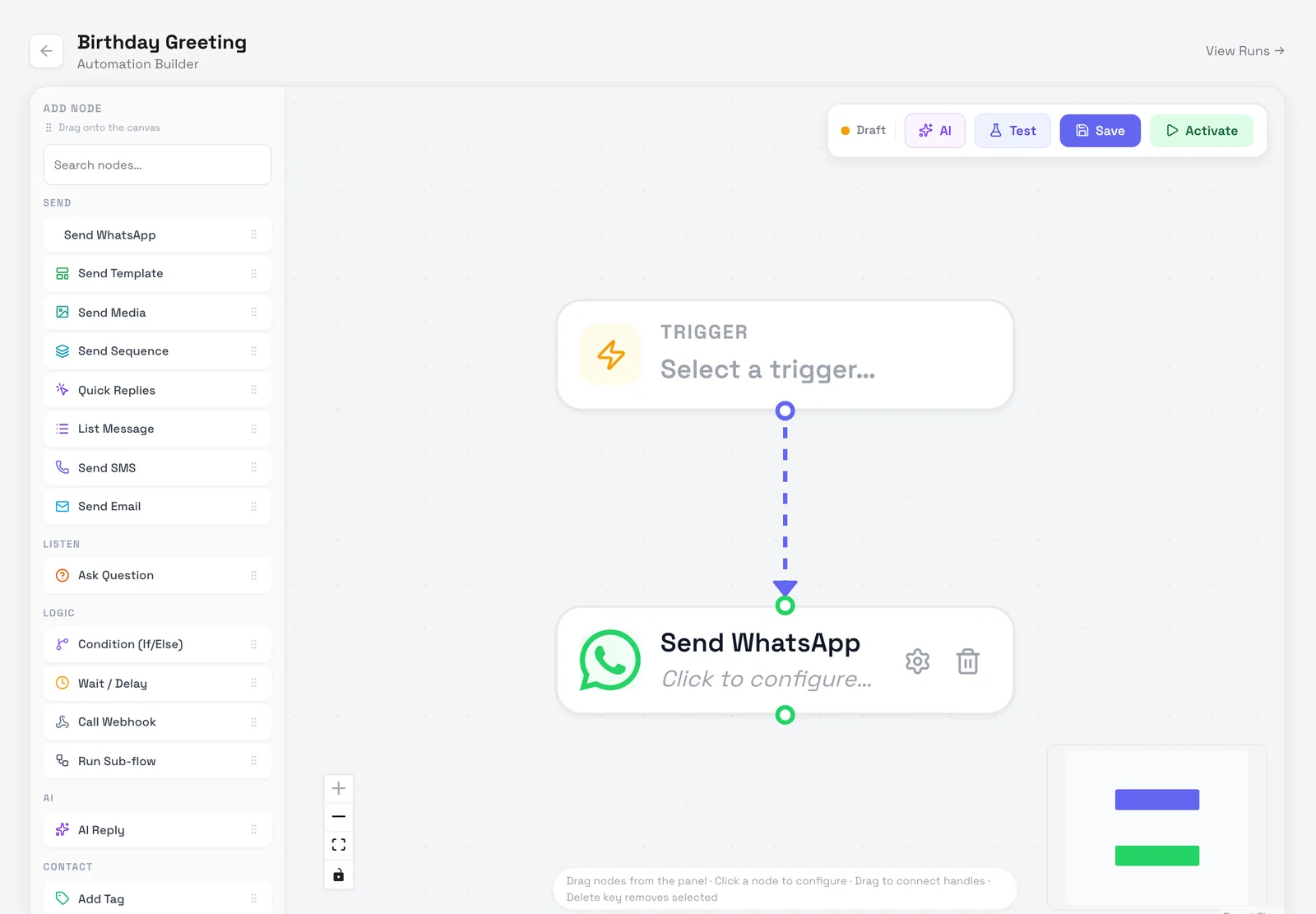
Connect triggers, conditions, and actions on a visual canvas. Let repeatable work take care of itself while your team takes care of people.

Explore visual automations
The WisperBot automation builder with a trigger and a WhatsApp step
  • Visual workflows

    See the path from event to action.

  • Contacts & segments

    Organize the people you need to reach.

  • Run visibility

    Review what happened and what needs attention.

Stay part of the conversation

From the first post to the next customer.

Plan your content, schedule supported posts, and keep a shared view of your social presence. Provider-aware controls keep the right actions within reach.

Manage supported Meta comments with additional account permissions. Public replies stay separate from private inbox conversations.

Explore social media automation
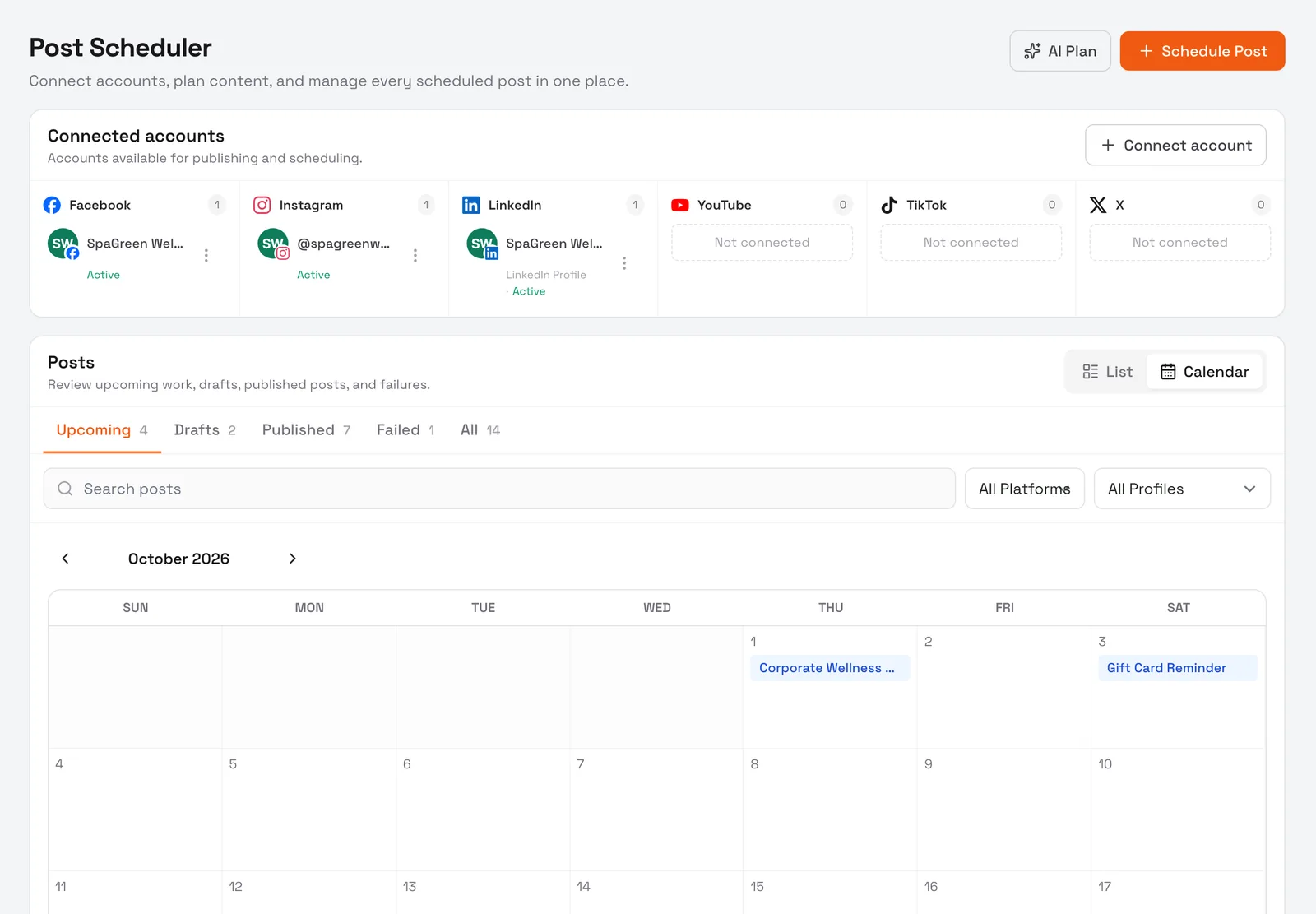
The WisperBot post scheduler with connected accounts and a content calendar (demo data)
Know the story behind the order

A better answer starts with better context.

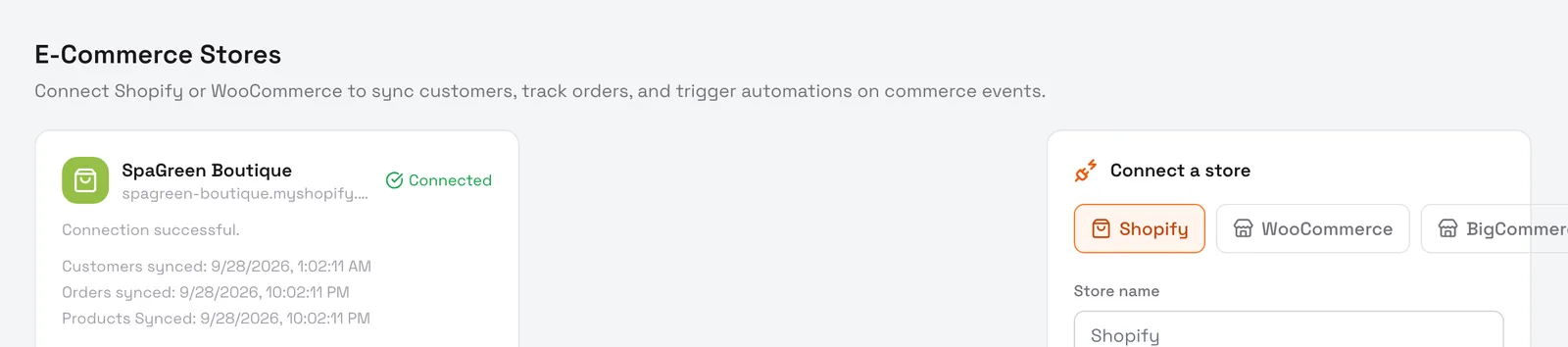
Connect supported stores and seller accounts. Give your team product and order context for more useful shopping conversations, with each marketplace handled on its own terms.

Explore commerce connections
A connected Shopify store in WisperBot (demo data)
  • Shopify
  • WooCommerce
  • BigCommerce
  • Amazon
  • eBay
Keep the relationship growing

Reach the right people. With a reason to reply.

Build useful audience segments and connect them to supported WhatsApp templates, SMS campaigns, and workflow follow-ups.

Explore marketing & engagement
YOUR AUDIENCE

A more thoughtful follow-up.

  1. Choose a contact segment01
  2. Use an approved template02
  3. Connect the next action03
WhatsAppSMSWorkflows
The right connection for the job

One platform does not mean one-size-fits-all.

Messaging, publishing, email, and commerce each do something different. Here is how they fit into WisperBot.

Find your integrations
ConnectionOmni InboxPublishingCommentsPurpose
Website chatSupported——Website embed
WhatsAppSupported——Templates & business messaging
Facebook / InstagramSupportedSupportedSupportedAccess depends on permissions
LinkedIn / X / TikTok / YouTube—Supported—Supported publishing formats
Gmail / Microsoft / IMAP———Dedicated Email MasterBox
Shopify / WooCommerce / BigCommerce———Product & order context
Amazon / eBay———Provider-specific seller workflows

Capabilities vary by account, provider permissions, region, and plan. Publishing access does not automatically include direct messages or comments.

Built around your team

Different goals. Better conversations.

Choose the workflow that fits your work today, with room to connect the rest tomorrow.

Give every customer a way forward.

Connect the inbox, your business knowledge, and the people who can help. Let AI handle a useful first answer while your team owns the relationship.

Explore this solution
Fits into your world

Keep your stack. Connect the conversation.

Bring supported channels and stores together, then extend your workspace through APIs, event webhooks, and the Customer Chat SDK.

Built to build on

Your product. Your customer experience.

Add chat to your app. Connect a workflow to your systems. Use authenticated APIs and event webhooks to make WisperBot part of your product.

Explore the developer platform
Trust starts with the foundations

Your workspace. Your people. Clear boundaries.

  • Workspace isolation

    Customer records and permissions stay within authorized workspaces.

  • Team access controls

    Give teammates access through defined roles and ownership.

  • Official connections

    Connect accounts through supported provider authorization paths.

  • Authenticated APIs

    Use workspace-scoped tokens and explicit integration access.

A useful place to start

Your brand. Your first channel. On us.

Get a real feel for AI-powered support before your business needs more.

Free plan

$0 / month

A small start, with a lot of possibility.

Connect your first channel and give your customers a helpful place to begin.

  • 1 connected channel
  • 100 AI credits every month
  • Customizable website chatbot
  • A shared workspace for customer conversations

Provider messaging and API charges may apply separately.

A few things you might be wondering

Good questions. Clear answers.

Visit the help & FAQ page
What can I use for free?

The free plan includes one connected channel and 100 AI credits each month. Website appearance controls help you match your brand; removing WisperBot branding requires an eligible plan.

Which channels can I connect?

Connect supported website, WhatsApp, Messenger, Instagram, Telegram, email, social publishing, and commerce accounts. Capabilities and account eligibility differ by provider; see the integrations directory.

How does the AI learn about my business?

Add supported website sources and documents to a Knowledge Base, review the content, and test answers. Assign that Knowledge Base to a Smart Bot and configure its answer scope and fallback behavior.

Can a real person take over?

Yes. Customers can ask for human help, and teammates can join conversations. Your team can work on web or through the dedicated Agent App.

How is workspace access controlled?

WisperBot scopes customer records and access to workspaces, with team roles, authenticated APIs, and encrypted stored integration credentials. Review your team permissions and provider connections as part of setup.

Is the mobile Agent App the same as the chat SDK?

The Agent App is for your staff to handle conversations. The Customer Chat SDK is for developers adding customer chat inside your own app.

No customer left waiting.

Start free

Free plan. No credit card. Talk to us