The Weekly 'Questions Your Bot Couldn't Answer' Review: A 20-Minute Routine
Most chatbot gaps are missing or outdated information. A 20-minute Monday routine, starting from your bot's unanswered questions, shows you what to fix first.
In this article
The fastest way to improve chatbot answers is a short weekly review of the conversations your bot couldn't handle. Every Monday, spend 20 minutes on two lists: the questions your bot has logged as unanswered, and last week's handovers and wrong answers. Tag each with a reason, fix the information behind the top two reasons, retest those questions and write down the count. Most gaps are missing or outdated information, not a weak AI, so most fixes take minutes.
Key takeaways
- Review weekly, not monthly. A gap left for a month has failed dozens of customers before you see it.
- Start from the Unanswered questions panel in each Smart Bot's Knowledge step, then add handovers and wrong answers, which the panel doesn't list. Tag each with one reason code.
- Fix the information the bot answers from. Don't loosen its answering mode to cover gaps.
- Some handovers are correct. Complaints, custom discounts and refunds should stay with people.
- Track two numbers over time: the Unanswered questions count, and handovers per week by reason. The top reason should keep changing.
Why does a chatbot need a weekly review?
Because your business changes faster than your bot's information. New stock arrives, a delivery charge goes up, an offer ends. A bot answers only from what you've given it, so every change you forget to tell it becomes a handover or, worse, a wrong answer. A weekly review catches those gaps while they're small.
Launch testing finds the gaps you can predict. The weekly review finds the ones customers find for you: the person in Sylhet asking whether you deliver to Sunamganj, the three people on Saturday asking if the new abaya comes in a longer length, the customer who writes only "COD?" and nothing else.
We'd put it on Monday morning for a practical reason: the weekend's messages are fresh, and any fix helps for six more days before the next review. It is also when we run it for Telzen, our own eSIM business, as described in how we run customer messaging for our eSIM business. This isn't only small-shop common sense. The US NIST AI Risk Management Framework lists Measure and Manage among its four core functions; a weekly review is the shop-sized version of both.
What counts as a question the bot couldn't answer?
Start with the questions the bot itself logs as unanswered: ones your knowledge had no answer for. Then add what that list can't see: conversations the bot handed to a person, ones a teammate took over because the answer was wrong, ones where the customer typed "agent" or "manush", and ones that went quiet straight after a bot message.
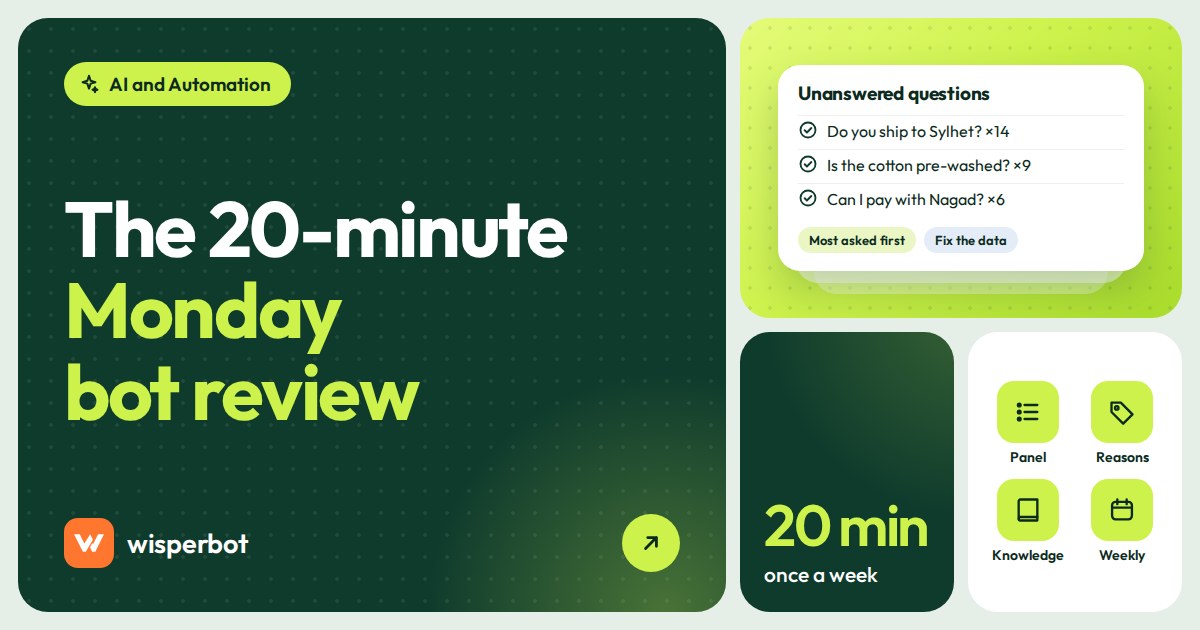
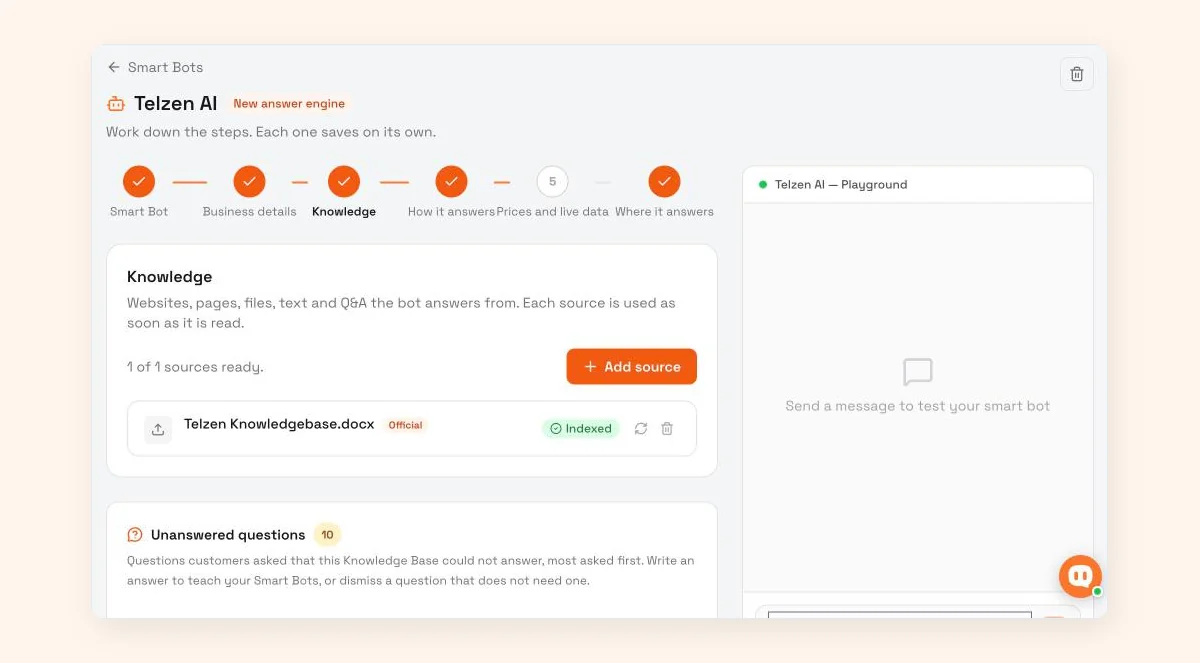
In WisperBot, a reply-first inbox for WhatsApp, Instagram, Messenger and website chat, the first list is the Unanswered questions panel in each Smart Bot's Knowledge step, with a count badge so you can see how many are waiting. The app describes it as "Questions customers asked that this Knowledge Base could not answer, most asked first." For each one you can write an answer to teach your Smart Bots, or dismiss a question that doesn't need one. Because it is sorted by how often people asked, the top of the panel is already in priority order.
The panel has a blind spot, and it matters. A question the bot answered wrongly never appears there, because the bot thought it had the answer. Neither does a complaint it correctly handed over. That's why the second list, built from labels, still earns its five minutes.
The last group is the easiest to miss. A customer who asks "Chattogram e delivery koto din?", gets a vague reply and goes quiet hasn't complained. They've just left. Scroll the conversations where the bot spoke last and nobody bought.
The 20-minute Monday routine
Set a timer. The point is to make this small enough that you never skip it.
- Minutes 0 to 5: open the Unanswered questions panel, then pull handovers. Read the panel from the top and dismiss anything that doesn't need an answer, such as a stray "hi". Then filter last week's conversations by the labels your team added at takeover (see the tagging tip below). On a small shop the two lists together are usually a few dozen items at most.
- Minutes 5 to 10: give each item a reason code. One code per question or conversation, from the table below. Don't fix anything yet.
- Minutes 10 to 17: fix the top two reasons. For a single missing fact, write the answer straight into the Unanswered questions panel. For anything bigger, add the missing delivery area to Knowledge, update the price sheet or write the policy line that didn't exist. Leave the rest for next week.
- Minutes 17 to 20: retest and log. Send the exact customer wording to the bot from a test account. If it now answers correctly, note the fix and the counts in a simple sheet: date, questions in the panel, total handovers, top reason, what you changed.
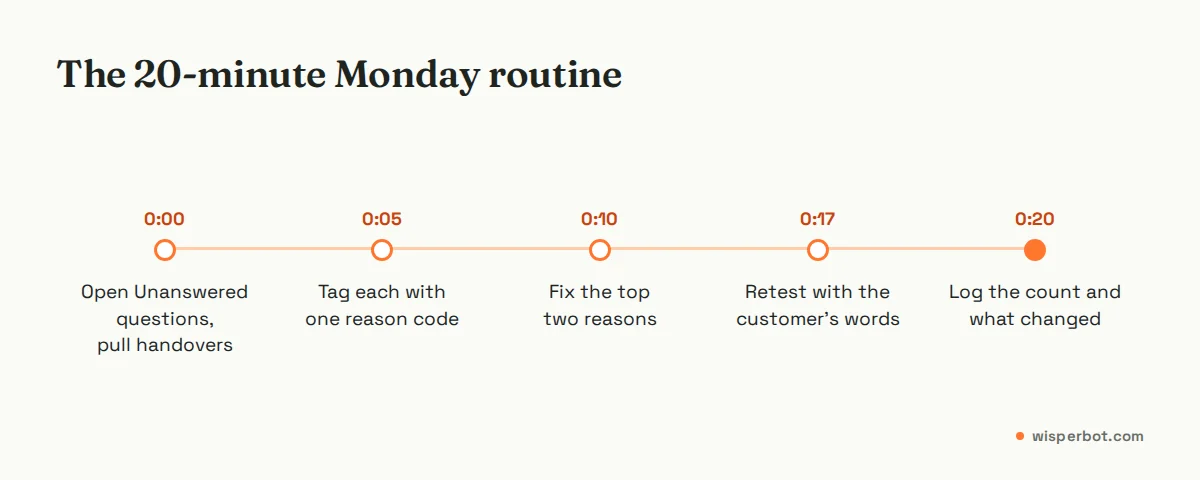
Two fixes a week sounds slow. It isn't. Over a quarter that's around 25 gaps closed, and because you always fix the most common reasons first, each one removes a lot of handovers.
One more step if you sell on WhatsApp: check whether any of those handed-over customers are still waiting. On the WhatsApp Business Platform you can send a normal reply only within 24 hours of the customer's last message; after that, Meta requires an approved template message. A Monday review that finds a Saturday customer still unanswered has usually missed that window.
Reason codes: what went wrong and the usual fix
Keep the list short. Eight codes cover nearly everything a small seller will see, and you can learn them in a week.
| Code | What it means | Example customer message | Usual fix |
|---|---|---|---|
| MISSING | The answer isn't anywhere in the bot's information | "Sunamganj e delivery den?" | Add the fact: delivery areas, charge, days |
| OLD | The information exists but is out of date | "Eid offer ta ki ekhono ache?" | Update or remove; add a "valid until" date |
| NAME | The bot didn't recognise what the customer called the product | "oi long jama ta" for a listed abaya | Add the customers' names for it alongside yours |
| SHORT | Message too short or vague to answer | "price?", "?", a photo with no text | Accept some handovers; tune the bot's clarifying question |
| POLICY | No written rule for the situation | "Size na mille change korte parbo?" | Write the rule with numbers: days, charges, exclusions |
| HUMAN | Should go to a person, and did | Complaint, bulk order, custom discount | No fix. This handover is correct |
| WRONG | The bot answered, but the answer was wrong | Quoted last month's price | Fix the data first; this code gets priority every week |
| OUT | Not something you sell or do | "Apnara ki gift wrap koren?" | Add a clear "we don't offer this" line |
WRONG always jumps the queue, even if it happened once. A handover costs you a few minutes. A wrong price costs you a customer, and possibly a screenshot in a Facebook group. Our guide on how to stop an AI chatbot making up prices and policies covers the guardrails that keep WRONG rare.
Tag during the week so Monday is quick
The Unanswered questions panel fills itself. The handover list doesn't, so the review takes 20 minutes only if most of that tagging happens as you go. When a teammate takes over a conversation from the bot, they add a label with the reason code ("bot: MISSING") and a one-line internal note: "asked about Sunamganj, not in delivery list". On Monday you filter by those labels and the list is already sorted.
How do you fix an answer without making the bot worse?
Change the information, not the bot's freedom. Add the missing fact to your knowledge, update the price sheet, or write the missing policy line with numbers. Don't loosen the mode to cut handovers: no WisperBot mode invents prices, dates or links, so you'd only swap an honest "I'll check" for a vaguer answer.
Three rules we follow:
- One fact, one place. If a delivery charge appears in two documents, delete one. Two versions means the bot will eventually pick the wrong one.
- Write facts, not scripts. "Delivery to Sylhet division: 3 to 5 days, Tk 130" helps with dozens of differently worded questions. A scripted answer to one exact sentence helps with that sentence.
- Retest with the customer's words. Paste the original message, typos and Roman Bangla included. If you retest with your own neat English version, you're testing something no customer sent.
What should you track from week to week?
Track the Unanswered questions count and handovers per week, split by reason code, in the same sheet every Monday. You're not chasing zero. You want MISSING, OLD and WRONG to shrink while HUMAN stays steady, because those are the conversations that genuinely need you.
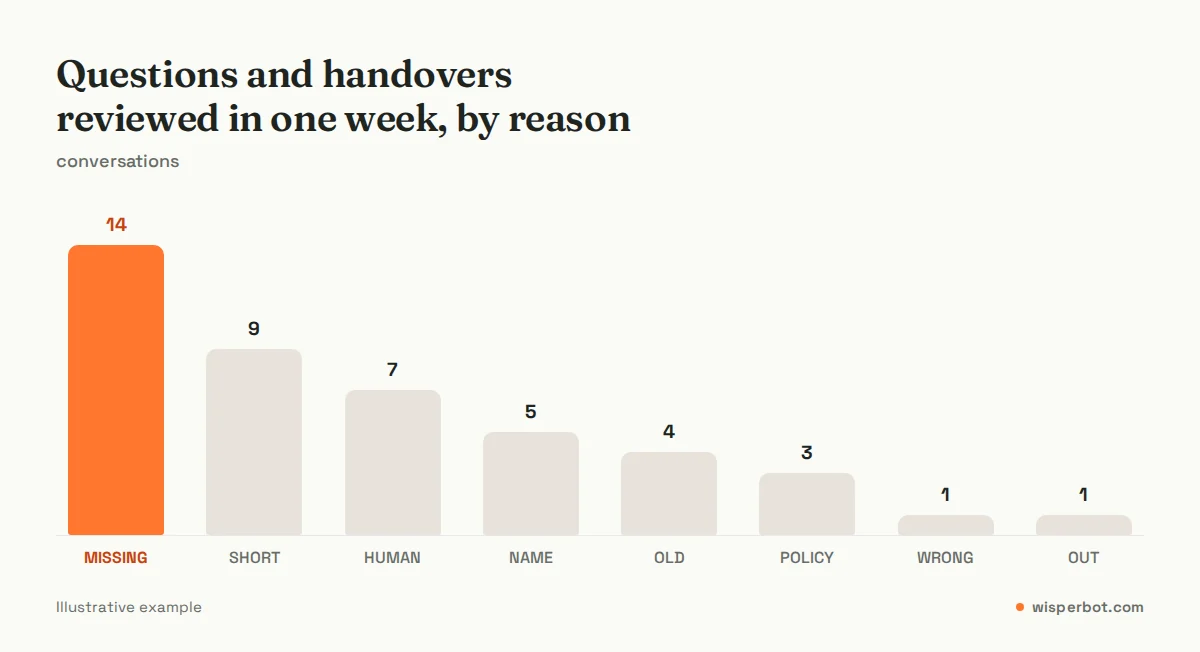
Read the chart for the top bar, not the total. In the illustrative week above, adding the missing delivery areas and a few product nicknames would clear more of the list than everything else combined.
Pair this with your inbox numbers. If you use WisperBot, the weekly performance digest email arrives on Mondays with median first response time (the time between a customer's first message and your first real reply) and median resolution time, which makes it a natural trigger for the review. Our list of seven numbers every DM seller should check on Monday covers the rest.
Three habits that make the review useless
Reviewing only after something goes wrong. If the review happens when a customer complains, you're reviewing one conversation, not a pattern. Put it in the calendar like a bill payment.
Fixing everything at once. The owner spends two hours on a Sunday rewriting the whole knowledge base, then doesn't touch it for two months. Two fixes every Monday beats twenty fixes once.
Counting every handover as a failure. If your team sees the handover number as a score to beat, someone will eventually loosen the bot's settings to make it go down. Keep HUMAN separate in your sheet and leave it alone. A customer asking for a wholesale rate for 50 pieces should reach you, every time.
Where WisperBot fits
WisperBot, a reply-first inbox for WhatsApp, Instagram, Messenger and website chat, gives you the pieces this routine needs without a separate tool. Each Smart Bot's Knowledge step has an Unanswered questions panel, most asked first, where you can write an answer or dismiss a question. Each conversation has an AI/Human switch, labels, assignment and internal notes, so handovers get tagged at takeover. Bigger fixes go into the Knowledge and Prices and live data steps. Reports show median first response and resolution times, and the digest lands on Monday. See the Smart Bot and the shared inbox.
Frequently asked questions
How often should I update my chatbot's knowledge base?
Update it whenever a price, offer or policy changes, and review it properly once a week. The weekly review, starting from the questions your bot logged as unanswered, catches what you forgot to update and what customers ask that you never wrote down. Big monthly clean-ups tend to get postponed, and a gap left for a month has already cost you conversations.
Does WisperBot show which questions the bot couldn't answer?
Yes. Each Smart Bot's Knowledge step has an Unanswered questions panel listing what customers asked that the Knowledge Base could not answer, most asked first, with a count badge. You can write an answer to teach your Smart Bots or dismiss the question. Wrong answers and handovers don't appear there, so label those in the inbox.
What is a good handover rate for an AI chatbot?
There is no reliable industry benchmark that fits every shop, so compare against your own weeks rather than a published figure. The rate should fall over the first month as you fill gaps, then level off. Some handovers, like complaints and custom discounts, should never go away, so don't aim for zero.
Can I improve a chatbot by correcting it in the chat?
With most business bots, including WisperBot's Smart Bot, you improve answers by updating the information the bot reads, not by arguing with it in a conversation. Add the missing fact, fix the outdated price or write the policy line, then retest using the customer's original message to confirm the bot now answers it.
Who should do the weekly chatbot review?
The person who knows prices and policies best, usually the owner or a senior team member, because most fixes are decisions: what is the delivery charge to Rangpur, do we exchange sale items. Teammates help by labelling handovers during the week. The owner then spends 20 minutes deciding, not searching.
Should I let the bot answer more freely to cut handovers?
Usually not. A looser mode lowers handovers by answering around the gaps with general guidance rather than your facts. In WisperBot no mode invents prices, dates or links, but a missing delivery charge is still missing. Fill the gaps with real information instead, and consider more freedom only for chatty, low-risk topics once prices and policies are reliable.
Sources
- Meta for Developers: WhatsApp Business Platform pricing and the 24-hour customer service window
- NIST AI Risk Management Framework (AI RMF 1.0, released 26 January 2023)
Last checked: 8 October 2026.