Instagram Auto Reply Messages: 35 Examples and How to Set Them Up
Thirty-five Instagram DM auto replies you can adapt, where each built-in setting lives, Meta's 24-hour and comment rules, and why you can't auto-DM new followers.
In this article
Your reel of the new linen co-ord set hits 40,000 views overnight, and by 8 am there are 63 DMs, most of them some version of "price?" or "pp". By the time you've answered the first 20, a few of the rest have bought the same set from a Page that answered at 7:30. Instagram's free tools can take some of the load: saved replies, frequently asked questions, an instant reply and an away message. This guide gives 35 Instagram auto reply message examples you can adapt, explains each Instagram auto reply setting and Meta's rules, and shows when a fixed reply stops being enough.
Key takeaways
- Instagram's built-in reply tools are saved replies and frequently asked questions in the app, plus instant reply, away message and custom keywords for Instagram in Meta Business Suite.
- Automated replies can only go to people who messaged you first, within 24 hours of their last message. A person can reply for up to 7 days using Meta's human agent tag.
- There's no approved way to auto-message every new follower: Meta's Instagram API has no follower event, and tools can only message people who wrote to you.
- Comment-to-DM is limited to one private reply per comment, sent within 7 days of the comment.
- If most DMs ask price, size and availability, an AI reply that answers from your product list saves more sales than a greeting.
What makes a good Instagram auto reply message?
A good Instagram auto reply sounds like your account, not a call centre. It answers or routes the question in one or two short lines, tells the person what happens next and when, and asks for the one detail you'll need, such as the product name or a screenshot. Leave out long welcomes and hashtags.
Instagram DMs are more casual than WhatsApp or email. People reply to stories with a single heart or "pp" (price please). An auto reply that starts "Dear valued customer, thank you for contacting us" lands badly, like a suit at a beach. Start with what they asked.
The best ones we see mention a time ("we reply 11 am to 9 pm"), point to something useful (a highlight called "Prices", a link in bio, a size chart) and ask for the product name. That last one matters more on Instagram than anywhere else: a heart on a story from six hours ago tells you nothing about which of the four pieces she means. Square brackets in the examples below are placeholders to replace.
35 Instagram auto reply message examples
They're grouped by moment: first messages, price questions, story replies, after hours, comment follow-ups, collaboration requests and closing lines. Some work as automatic replies, others as saved replies a person inserts. The tables mark which is which, because a saved reply pasted into an instant reply slot ("That one's sold out in [size], sorry") goes out to everyone.
First DM and welcome (1 to 7)
| # | Use it as | Example message |
|---|---|---|
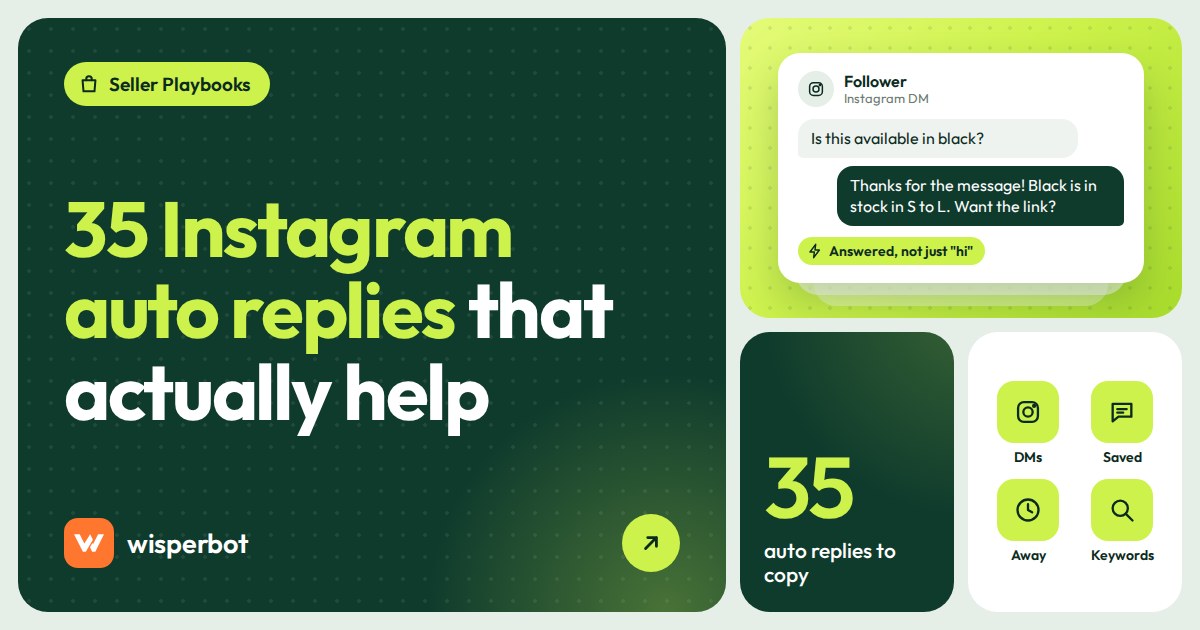
| 1 | Instant reply | Hi, thanks for messaging [Brand]. Send the product name or a screenshot and we'll get you price and sizes. |
| 2 | Instant reply with hours | Hey, you've reached [Brand]. We reply from [11 am to 9 pm]. Our price list is in the "Prices" highlight on our profile. |
| 3 | Instant reply, small studio | Hi, it's [Name] from [Studio]. I answer DMs myself, usually within [2 hours] during the day. What are you looking for? |
| 4 | Instant reply, salon or service | Hi, welcome to [Salon]. Tell us the service you'd like and a day that suits you, and we'll send available times. |
| 5 | Instant reply, restaurant | Hi, thanks for messaging [Restaurant]. Menu and prices are in our link in bio. For a table, send the date, time and number of people. |
| 6 | Instant reply, bilingual (Gulf) | Hi, welcome to [Brand]. You can write to us in English or Arabic. Which item are you interested in? |
| 7 | FAQ starter question | "How do I order?" Answer: Send us the product name, size and your delivery area, and we'll confirm the total. |
Price questions (8 to 14)
| # | Use it as | Example message |
|---|---|---|
| 8 | Saved reply | [Item] is [price]. Sizes [S to XL] are in stock. Which size would you like? |
| 9 | Saved reply, no context | Happy to help. Which piece is it? A screenshot or the post link works. |
| 10 | FAQ answer | All prices are in our "Prices" highlight and in the link in bio. Delivery is [price] in [city]. |
| 11 | Saved reply, sale | It's [sale price] until [Sunday midnight], down from [full price]. Want me to hold one in your size? |
| 12 | Saved reply, bundles | One is [price], or any two for [bundle price]. Free delivery on orders over [amount]. |
| 13 | Saved reply, custom work | Custom pieces start at [price] and depend on size and fabric. Send a reference photo and your measurements and we'll quote. |
| 14 | Saved reply, sold out | That one's sold out in [size], sorry. [Similar item] is similar and available at [price]. Want photos? |
Story replies and mentions (15 to 19)
| # | Use it as | Example message |
|---|---|---|
| 15 | Saved reply to a story reaction | Thanks. That's our [item], [price]. Want sizes and colours? |
| 16 | Saved reply, story poll or question | Thanks for voting. The [colour] wins, and it drops on [date]. We'll post here first. |
| 17 | Saved reply, customer tagged you | Thank you for the tag, it looks great on you. Mind if we share it on our story? |
| 18 | Saved reply, giveaway story | You're in. Winners are announced on [date] in our stories, and we'll DM the winner from this account only. |
| 19 | Saved reply, launch countdown | It goes live on [date] at [8 pm]. Send "remind me" and we'll message you when it's up. |
After hours and away (20 to 25)
| # | Use it as | Example message |
|---|---|---|
| 20 | Away message | Thanks for your message. We're offline until [11 am] and will reply then. Prices are in our "Prices" highlight. |
| 21 | Away message, order details | We're closed for the night. If you're ordering, send the item, size, name and delivery area now, and we'll confirm first thing. |
| 22 | Away message, weekend | We don't reply on [Sundays]. Your message is saved and we'll answer on [Monday] morning. |
| 23 | Away message, holiday | We're on holiday from [date] to [date]. Orders placed now ship on [date]. |
| 24 | Away message, during a live | We're live right now. We'll answer every DM after the live ends at [10 pm]. |
| 25 | Away message, short | Away right now, back at [11 am]. |
Comment follow-ups in DM (26 to 29)
These are private replies sent after someone comments, so Meta's one-message rule applies. You get one shot, so put the price in it, not "check DM".
| # | Use it as | Example message |
|---|---|---|
| 26 | Private reply to "price?" | Hi, you asked about [item] on our post. It's [price], sizes [S to XL]. Reply here with your size to order. |
| 27 | Private reply to "link?" | Here's the link you asked for: [link]. Any questions about sizing, reply here. |
| 28 | Private reply to "available?" | Yes, [item] is in stock in [sizes]. Want me to keep one aside for you? |
| 29 | Private reply to a complaint | Sorry about this. Can you send your order number here so we can sort it out today? |
Collaboration requests (30 to 33)
| # | Use it as | Example message |
|---|---|---|
| 30 | Saved reply, creator pitch | Thanks for reaching out. Please email [email] with your follower count, past brand work and rates, and we'll reply within [a week]. |
| 31 | Saved reply, not right now | Thanks for thinking of us. We're not taking on collaborations this month, but we've saved your profile for later. |
| 32 | Saved reply, gifting | We do a small number of gifted collaborations. Send your profile stats and the piece you'd feature, and we'll let you know. |
| 33 | Saved reply, wholesale or stockist | For wholesale, please email [email] with your shop name and city. Minimum order is [quantity]. |
Closing the chat (34 and 35)
| # | Use it as | Example message |
|---|---|---|
| 34 | Saved reply, order done | All set. Your [item] ships on [date]. We'll send tracking here. |
| 35 | Saved reply, after delivery | Hope you love it. If anything isn't right, message us here with a photo, and tag us if you wear it. |
Which Instagram auto reply settings are built in?
Instagram's free reply tools come in two places. In the Instagram app you have saved replies and frequently asked questions. In Meta Business Suite, under Inbox and then Automations, you can set an instant reply, an away message and custom keywords for Instagram. Guides report that custom keywords are desktop-only. Menu names change often, so expect small differences.
We couldn't verify Meta's Help Centre pages directly on the day, so the details below come from Meta's developer documentation and setup guides published in 2026. Treat the limits as a guide and check them on your own account.
| Tool | Where you set it | What it does | Worth knowing |
|---|---|---|---|
| Saved replies | Instagram app | Stores a message you insert with a shortcut | A person still has to send it |
| Frequently asked questions | Instagram app (business tools) | Shows question buttons when someone starts a chat; tapping one sends your answer | Guides report a maximum of four questions |
| Instant reply | Meta Business Suite, Automations | Sends a greeting when someone starts a new conversation | Can't read the question |
| Away message | Meta Business Suite, Automations | Replies during the hours you mark as unavailable | Set hours with "Add time" |
| Custom keywords | Meta Business Suite, desktop | Sends a fixed reply when a message contains a phrase you chose | Up to five phrases, exact match, and guides say it waits about 15 minutes for a person first |
Setting up the Business Suite ones takes about ten minutes.
- Connect your Instagram professional account to your Facebook Page and open Meta Business Suite.
- Go to Inbox, then Automations, and create an automation.
- Choose Instant reply, tick Instagram, paste example 1 or 2 and save.
- Create an Away message, tick Instagram, click "Add time" to set when you're unavailable, paste example 20 or 21 and save.
- On desktop, add a custom keyword only for phrases with one fixed answer, such as "delivery" or "size chart".
- Test from a friend's account: once during your hours, once outside.
How do Instagram saved replies work?
Instagram saved replies are messages you store with a short shortcut. In a chat, type the shortcut and Instagram suggests the saved text, which you tap to insert and then send. They don't send automatically, so they help whoever is answering type faster and stay consistent. Guides describe saving one by holding a sent message and choosing Save.
Use them for examples 8 to 19 and 26 to 35, where the reply needs the right product, size or date. Twenty well-chosen saved replies cover most of a fashion account's DMs. We've seen accounts with 80. Nobody remembered the shortcuts past the first dozen, so the other 68 might as well not exist.
Can you send an Instagram auto reply to new followers?
Not with approved tools. Meta's Instagram Messaging API only lets an app message someone after that person has messaged your account, and Instagram's webhook list has no new-follower event, so there's nothing for a tool to trigger on. Products promising automatic DMs to every new follower risk breaking Meta's rules and your account.
The workaround is to get new followers to message you. Pin a post or story that says "DM us SIZE for the size chart", put "DM 'price' for the full list" in your bio, and let your instant reply or keyword automation answer that first message. Now they've written first, and everything after it is within the rules. It's slower than a follower blast would be. It also doesn't get your account restricted the week before Eid.
What are Meta's rules for automated Instagram DMs?
Automated replies, from a bot or a tool, can only be sent within 24 hours of the customer's last message, and only to people who messaged you first. After 24 hours, a person (not a bot) can still reply for up to 7 days using Meta's human agent tag. Comments allow one private reply within 7 days.
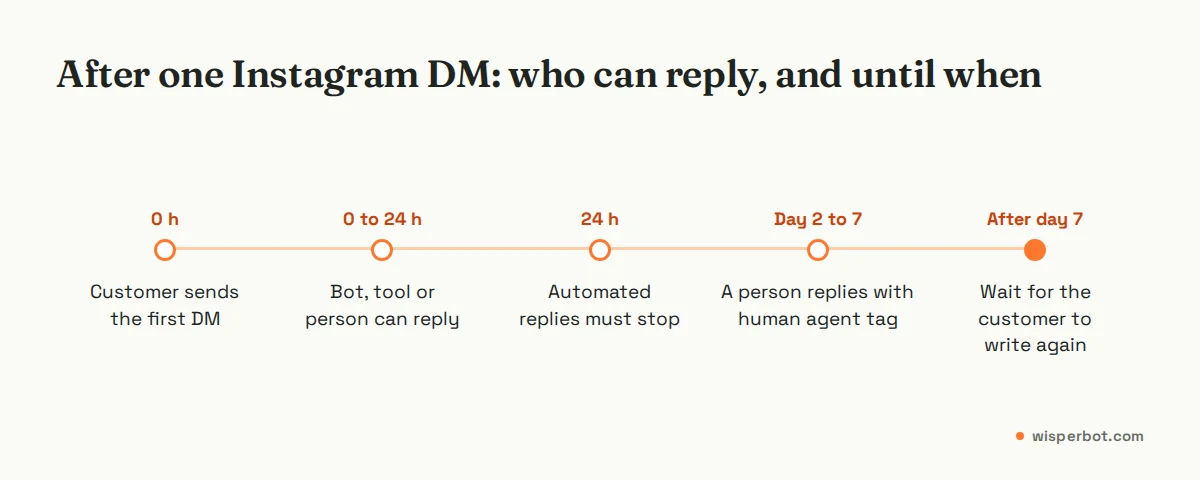
In practice that means an overnight DM should be answered by the next evening, which is easy, and a DM from Friday shouldn't sit until the following Saturday, which happens more than people admit, usually after a long weekend and a wedding. Our explainer on Meta's 24-hour messaging window covers the details, including how WhatsApp differs.
Comments have their own rules. One private reply per comment means "check DM" followed by a second message fails if they haven't replied. Put the price in the first DM. The full approach is in our guide to replying to comments without losing buyers.
When should you move from fixed replies to an AI inbox?
Move when your DMs outgrow what one person can answer within a few hours, when you sell on more than one channel, or when the same price and size questions arrive overnight. Fixed replies and saved replies are fine below that. An AI inbox earns its cost when it answers the question rather than greeting the person.
A rough test: count last week's DMs that asked something your product list already answers. If that's more than about a third, and many came outside your hours, an AI reply that reads the question and answers from your own list will save sales. Bookings are a good fit too, as in our guide to salon and spa booking questions in Instagram DMs.
Keep a person for complaints, custom orders and anything involving photos of a damaged parcel. Then, every Sunday, read what the bot couldn't answer. Expect things like "do you ship to Sylhet?" that nobody thought to write down.
Where WisperBot fits
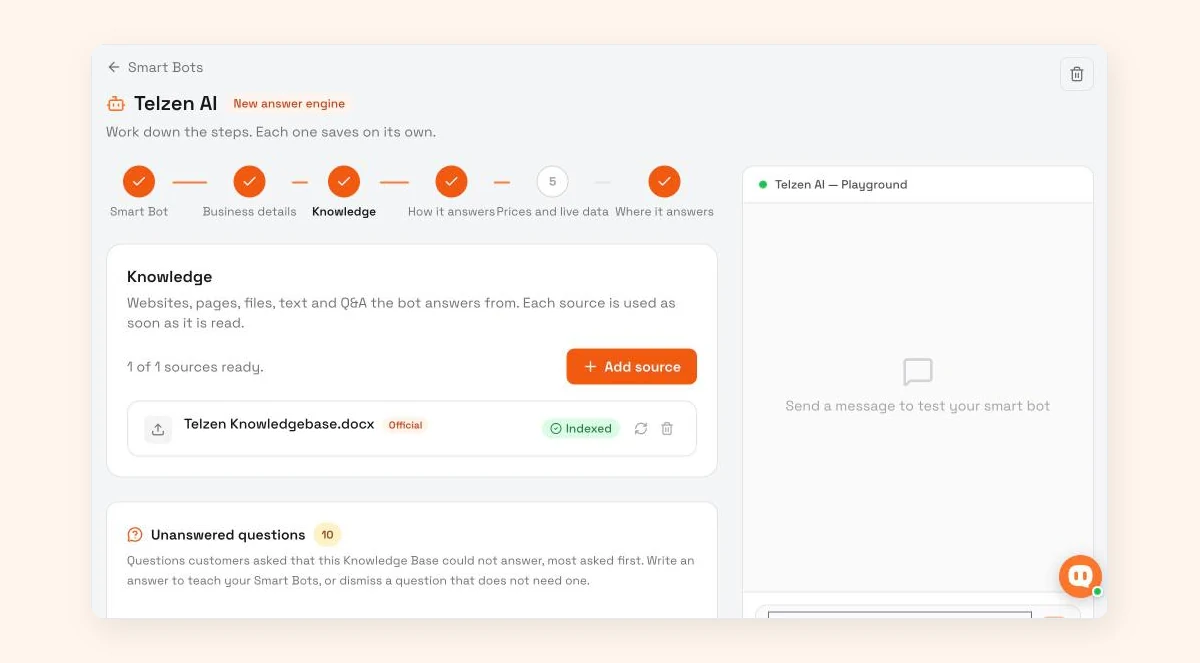
WisperBot, a reply-first inbox for WhatsApp, Instagram, Messenger and website chat, puts Instagram DMs in the same inbox as your other channels. A Smart Bot answers from your own knowledge and price list, in seconds and in the customer's language, and hands over to your team when unsure. Each Smart Bot has an Unanswered questions list, showing questions it couldn't answer, most asked first, so you can write the missing answer. Quick Replies work like Instagram saved replies: type /shortcut. Comment replies are rolling out, so for now handle comments in Instagram. See the inbox.
Frequently asked questions
How do I turn on auto reply on Instagram?
Open Meta Business Suite with your Instagram professional account connected, go to Inbox, then Automations, and create an instant reply or away message with Instagram ticked. In the Instagram app itself, you can add frequently asked questions and saved replies. If you're still on a personal account, switch to a professional one first.
Can Instagram auto reply to story replies?
Yes. A reply to your story arrives in your DMs as a message, so your instant reply, away message and keyword automations treat it like any other first message. The person wrote first, so a bot or tool can also answer within the 24-hour window.
Is it allowed to use a bot for Instagram DMs?
Yes, through tools that use Meta's official Instagram Messaging API. They can reply to people who messaged you first, within 24 hours of their last message. They can't message people who never wrote to you, such as new followers, and only a person can reply after 24 hours, using the human agent tag.
How many FAQs can I add on Instagram?
Setup guides report a maximum of four frequently asked questions in the Instagram app. Use them for the questions that start most chats, such as price list, delivery, sizes and how to order, and keep each answer to a line or two with a pointer to where the full detail lives.
Does an Instagram away message affect my account?
Not in any way Meta documents. The away message is one of Meta's own built-in automations, so using it is fine. It just doesn't answer anything, so if people regularly ask real questions after hours, an away message alone leaves them waiting, and some will buy from the next account that answers.
Sources
- Meta for Developers: Instagram Messaging API (24-hour window, messaging only after the user writes first)
- Meta for Developers: Instagram webhooks (available event fields)
- Meta for Developers: Instagram private replies (one reply within 7 days)
- Meta for Developers: Send API reference (HUMAN_AGENT tag)
- CreatorFlow: Instagram auto reply setup (updated August 2026)
- CreatorFlow: Instagram built-in automation (FAQ limit, custom keywords, August 2026)
Last checked: 12 October 2026.