40 Saved Replies for Online Sellers (Copy-and-Paste Templates)
Forty short, human saved replies for the DMs online sellers get every day, grouped by situation, plus rules for keeping them personal and accurate.
In this article
Customer service reply templates for an online store are short, pre-written answers to the questions you get every day: price, stock, size, delivery, payment, returns and refunds. The good ones are two or three lines long, leave a blank for the one detail that changes, and end with a clear next step for the customer. Below are 40 templates you can copy, grouped by situation, plus the rules we use to keep them sounding like a person and not a form letter.
Key takeaways
- Keep every saved reply under about 40 words, with one [blank] for the detail that changes.
- End each reply with a question or a next step, so the conversation keeps moving towards an order.
- Never template the first reply to an angry customer or a refund amount: type those yourself.
- On WhatsApp, once 24 hours pass after the customer's last message, the WhatsApp Business Platform only lets you send pre-approved message templates.
- Review your saved replies whenever prices, delivery charges or return rules change, or they will quietly give wrong answers.
Why do online sellers need saved replies at all?
Because most DMs are the same ten questions. As an example, a shop getting 80 messages a day can easily answer "delivery charge koto?" thirty times before dinner. Saved replies cut each of those to a few seconds, keep facts consistent across the team, and stop the tired 11:40 pm answer from quoting last month's delivery charge.
That second point matters more than the speed. When three people answer the same page, you get three versions of the return policy. One says seven days, one says "within a week", one forgets that sale items can't be returned. A saved reply is your policy written down once.
Saved replies are not a script, though. Customers can tell when they are being pasted at. The fix is in how you write them.
What makes a saved reply sound human?
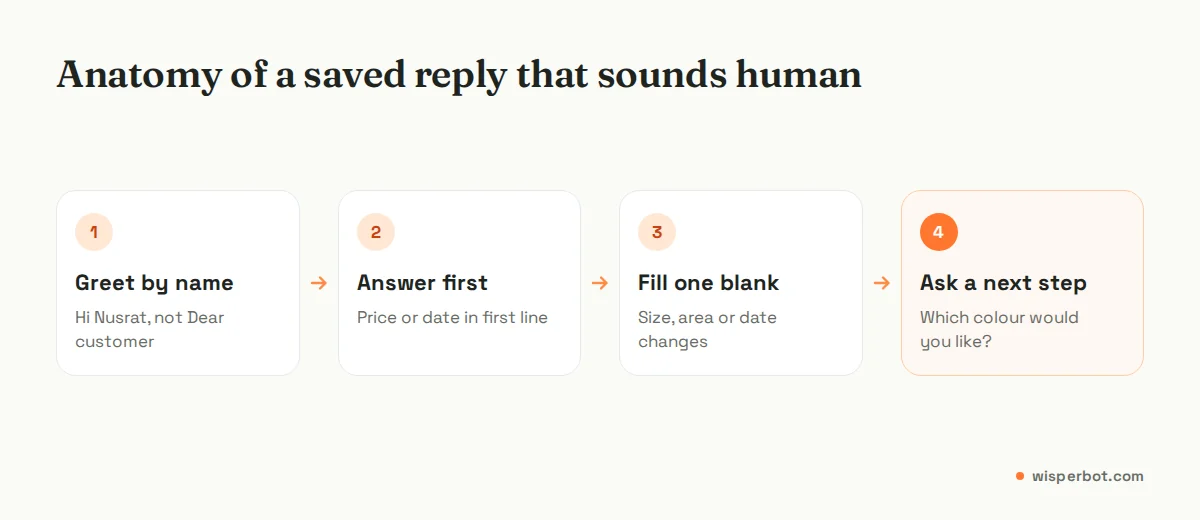
A human-sounding saved reply uses the customer's name or product, answers the exact question in the first line, and ends with one simple question. It avoids corporate phrases like "We regret to inform you" and keeps one blank to fill in each time, so you have to read the message before you send it.
A few rules we stick to when writing them:
- Answer first. If someone asks the price, the price is in the first eight words. Not "Thank you for reaching out to us".
- Leave one blank on purpose. A [size] or [date] you must fill forces a quick read. It stops you sending the Dhaka delivery charge to someone in Chattogram.
- One question at the end. "Which colour would you like?" moves the sale. "Let us know if you have any other questions" does nothing.
- Match the customer's language. If they write in Roman Bangla, Hinglish or Arabic, keep a version of your top ten replies in that style too. English to a "dam koto apu?" message reads cold.
- Sign off as a person. "Rafi from [shop name]" reads better than "Team [shop name]", especially on complaints.
The 40 templates, grouped by situation
Words in [square brackets] are blanks you fill each time. Swap in your own currency, courier names and policies. If a template promises something your shop doesn't actually do, delete it rather than send it.
Price questions (1 to 4)
The most common DM, and the one most often sent from a post with six products in it. Template 2 saves a lot of back-and-forth. For a longer look at price DMs, see our guide to answering "price koto?" messages automatically.
| # | Use when | Template |
|---|---|---|
| 1 | Single product price | Hi [name], the [product] is ৳[price]. It comes in [colours or sizes]. Which one would you like? |
| 2 | Post shows several items | Thanks for asking. That post has a few items, so could you send a screenshot or the code under the photo (like A12)? Then I'll give you the exact price. |
| 3 | Offer price | [Product] is ৳[offer price] until [date], then it goes back to ৳[normal price]. Would you like me to note one for you? |
| 4 | "Last price?" | I understand. Our price is fixed at ৳[price] because [reason, e.g. delivery inside Dhaka is included]. If you take two, the second is ৳[price]. Shall I set that up? |
Stock, size and colour (5 to 9)
Size questions are where returns start. If template 8 feels like extra work, compare it with the cost of a return trip through a courier.
| # | Use when | Template |
|---|---|---|
| 5 | In stock | Yes, the [product] in [size/colour] is in stock right now. Shall I put an order in for you? |
| 6 | Out of stock, alternative exists | Sorry, [size/colour] is sold out. We do have [alternative] at ৳[price], which is very close. Want me to send a photo? |
| 7 | Restock date unknown | We don't have a confirmed restock date yet. Is it OK if I message you here as soon as it's back? |
| 8 | Which size? | Could you tell me your usual size, or your chest measurement in inches? Our [M] fits roughly a [38 to 40] inch chest. |
| 9 | Colour looks different | Colours can look a little different on phone screens. Here's an unedited photo taken in daylight: [photo]. Does this shade work for you? |
Delivery charge and time (10 to 13)
Give the total, not the charge on its own. "৳1,250 including delivery" closes faster than making the customer add ৳1,150 and ৳100 in their head.
| # | Use when | Template |
|---|---|---|
| 10 | Delivery charge | Delivery is ৳[x] inside [city] and ৳[y] outside. So your total for [product] would be ৳[total]. Where should we send it? |
| 11 | How long? | Orders confirmed before [time] usually reach you in [x] days inside [city] and [y] days outside. Fridays and public holidays can add a day. |
| 12 | Specific area | Yes, we deliver to [area] through [courier]. It usually takes [x] days. Would you like to order? |
| 13 | Same-day delivery | Same-day delivery works in [areas] for orders confirmed before [time], for ৳[x]. Shall I check if your address is covered? |
Payment (14 to 16)
| # | Use when | Template |
|---|---|---|
| 14 | Payment options | You can pay cash on delivery or by [methods]. For orders outside [city] we ask for the delivery charge (৳[x]) in advance. Which suits you? |
| 15 | Advance payment | Please send ৳[amount] to [account] and reply with the last 4 digits of the transaction ID. I'll confirm as soon as it shows. |
| 16 | Payment not showing | I've checked and can't see ৳[amount] yet. Could you send a screenshot of the payment? It sometimes takes [x] minutes to come through. |
Order confirmation and status (17 to 19)
Template 17 is the one that prevents most "that's not what I ordered" messages later. Make the customer reply OK.
| # | Use when | Template |
|---|---|---|
| 17 | Confirming an order | Your order: [product, size, quantity], total ৳[total] including delivery, to [address]. Please reply OK, or tell me what to change. |
| 18 | Shipped | Your parcel left us today with [courier]. Tracking: [code]. The rider usually calls before arriving, so keep your phone close. |
| 19 | "Where is my order?" | Let me check for you. Could you send your order number, or the phone number you ordered with? |
Late delivery (20 to 22)
Give a time you will update them by, and then actually update them. A specific "by 3 pm tomorrow" calms people more than "soon".
| # | Use when | Template |
|---|---|---|
| 20 | Running late, reason known | Sorry [name], your order is late because [reason]. The new delivery date is [date]. I'll message you if anything changes. |
| 21 | Courier delay | The courier has your parcel but is running behind in [area]. I've chased them and will update you here by [time] tomorrow. |
| 22 | Making up for it | Sorry this took so long. To make up for it, [something you can really give, e.g. free delivery on your next order]. |
Wrong or damaged item (23 to 25)
| # | Use when | Template |
|---|---|---|
| 23 | First reply to a problem | I'm really sorry about this. Could you send a photo of what arrived and the label on the parcel? I'll sort it out today. |
| 24 | Wrong item confirmed | You're right, we sent the wrong [item/size]. We'll send the correct one by [date] and the rider will collect the other. You won't pay anything extra. |
| 25 | Damaged in transit | That shouldn't have happened. We can send a replacement by [date] or refund ৳[amount]. Which would you prefer? |
Returns (26 to 28)
| # | Use when | Template |
|---|---|---|
| 26 | Return policy | You can return unused items with the tag on within [x] days of delivery. [Who pays the return delivery]. Would you like to start a return? |
| 27 | How to return | Pack the item with its tag, write [order number] on the bag, and hand it to our rider on [day]. We'll confirm when it reaches us. |
| 28 | Outside the return window | This order is past our [x]-day return window, so I can't take it back. I can offer [exchange/credit, if you do], if that helps. |
Refunds (29 to 31)
| # | Use when | Template |
|---|---|---|
| 29 | Refund approved | Your refund of ৳[amount] is approved. It will go to [method/account] within [x] working days. I'll send the transaction ID once it's done. |
| 30 | "When will I get my refund?" | We sent ৳[amount] on [date] to [account], transaction ID [ID]. Could you check again? If it hasn't arrived by [date], reply here and I'll chase it. |
| 31 | Refund not possible | I'm sorry, we can't refund this one because [specific reason]. What I can do is [alternative]. Would that work? |
After hours (32 to 34)
These are the replies that quietly lose the most orders, because a "we're closed" message with no next step reads like a dead end at midnight.
| # | Use when | Template |
|---|---|---|
| 32 | Outside working hours | Thanks for your message. We're offline now and back at [time]. Send the product name and size and we'll reply first thing. |
| 33 | Holiday closure | We're closed for [holiday] from [date] to [date]. Orders placed now will ship on [date]. You can still order here and we'll confirm when we're back. |
| 34 | Next morning follow-up | Good morning [name], sorry we missed you last night. About [product]: [answer]. Would you like to go ahead? |
Handing over to a person (35 to 37)
| # | Use when | Template |
|---|---|---|
| 35 | Passing to a colleague | I'm passing this to [name], who handles [refunds/wholesale]. They'll reply here by [time], and you won't need to repeat anything. |
| 36 | Offering a call | Would a quick call be easier? Send a good time and number and [name] will ring you. |
| 37 | Customer is upset | I can see this has been frustrating. Rather than send another standard reply, I've asked [name] to take this over personally. They'll message you by [time]. |
Reviews and repeat customers (38 to 40)
| # | Use when | Template |
|---|---|---|
| 38 | Check after delivery | Hi [name], your [product] should have arrived on [day]. Is everything OK with it? |
| 39 | Asking for a review | Glad you like it. If you have a minute, a short review on our page would really help a small shop like ours: [link]. |
| 40 | Repeat customer | Good to see you again, [name]. Last time you got [product] in [size]. Same size this time, or something different? |
Which messages should never get a template?
Do not template the first reply to an angry customer, any message that states a refund amount you haven't checked, anything involving a customer's health, safety or legal threat, and replies to influencers or wholesale buyers. These need a typed answer, because a pasted one makes a bad situation worse and a wrong number costs real money.
Template 23 looks like it breaks this rule, but it doesn't: it asks for a photo and buys you time, but it doesn't pretend to resolve anything. The second message, after you've seen the photo, should be typed.
The other trap is sending a template that is technically correct and still misses the point. A customer writes "I ordered for my sister's wedding on Friday, will it come?" Template 11 answers the delivery question. It ignores the wedding. Add one line ("Friday is tight but doable if we ship today") and you've shown you read the message.
How do you set up shortcuts so the team actually uses them?
Name each saved reply with a short, guessable shortcut grouped by topic, such as /price1, /size, /cod or /late, and keep the full list in one shared document. If people can't remember the shortcut in two seconds, they will type from memory instead, and the old inconsistent answers come back.
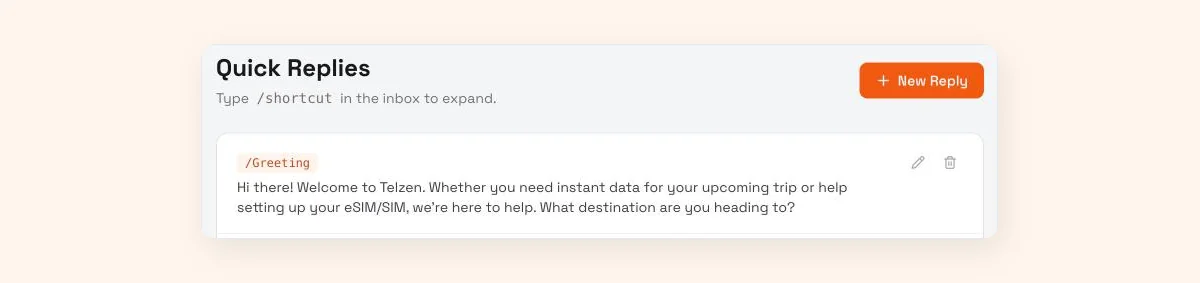
The WhatsApp Business app has quick replies built in, described by WhatsApp as shortcuts "for messages you frequently send". That works well for a one-person shop on one phone. Once two or more people answer, or you also sell through Instagram and Messenger, you want the same replies available to everyone in one place. In WisperBot, for example, these live in Quick Replies in the shared inbox (type a /shortcut to insert one), so anyone on the team can insert the same text into a WhatsApp, Instagram or Messenger conversation.
Some practical habits:
- Put the policy date in your shared list ("Delivery charges, updated 1 October"). When the courier raises prices, you'll know which replies to fix.
- Before a big campaign, read every price and delivery template out loud. Our sale-day inbox plan covers the rest of that prep.
- Write holiday versions of templates 32 and 33 a fortnight before Eid, not on the last working day. The Ramadan and Eid inbox checklist has the full list.
- Delete templates nobody used in the last month. Forty is a starting point, not a target.
What about follow-ups after 24 hours?
On WhatsApp's business platform, a 24-hour customer service window opens each time the customer messages you. Inside it, you can send any reply, including your saved ones, though since 1 October 2026 Meta charges for each one beyond the first 1,000 per business number per month, at the utility rate for that market. Once it closes, Meta only allows pre-approved message templates, so a review request three days after delivery needs an approved template, not a saved reply.
This catches sellers out with templates 7, 38 and 39, which are often sent days later. Messenger has a similar 24-hour standard messaging window, with a separate human agent tag that allows manual replies for up to 7 days. If you use the WhatsApp Business Platform, read our explainer on the 24-hour messaging window before you plan follow-ups, and our guide to WhatsApp message templates that get approved for the ones you send later.
Where WisperBot fits
WisperBot, a reply-first inbox for WhatsApp, Instagram, Messenger and website chat, has Quick Replies in the inbox (type /shortcut to insert one), so the 40 templates above can live where your whole team answers. It also takes a second route to the same problem. Instead of a person pasting template 10 for the thirtieth time, the Smart Bot answers price, stock and delivery questions in seconds from your own information: the policies you add as knowledge and a price list you upload as a CSV or Google Sheet. Strict mode keeps it to that information, and it asks or hands over when it isn't sure.
So the routine templates (1 to 16, roughly) become knowledge for the bot, and the ones that need judgement (23 to 31, 35 to 37) stay with your team. The AI/Human switch on each conversation lets someone take over the moment a customer needs a person. It isn't the right fit if you get ten DMs a day and enjoy answering them yourself: the WhatsApp Business app's quick replies will do fine.
Frequently asked questions
How many saved replies should a small online shop have?
Start with 15 to 20 covering price, delivery, payment, order status and returns. Those handle most daily DMs. Add others only when you notice yourself typing the same answer three or four times in a week, and delete any template nobody has used in a month so the list stays easy to search.
Is it OK to send the same template to every customer?
Yes, for factual answers like delivery charges or return windows, as long as you fill in the customer's name or product and answer anything extra they asked. It isn't OK for complaints, refunds or anyone who is clearly upset. Those customers notice a pasted reply and usually get angrier.
Can I send a saved reply on WhatsApp after 24 hours?
In the WhatsApp Business app, yes. On the WhatsApp Business Platform (the API used by inbox tools), no: after 24 hours since the customer's last message you can only send a message template that Meta has approved. Plan review requests and restock alerts with that rule in mind.
What is the difference between a saved reply and an auto-reply?
A saved reply is text a person chooses and sends by hand. An auto-reply goes out automatically, like WhatsApp's away message or an AI bot's answer. Saved replies keep a human in every conversation. Auto-replies answer when nobody is there, which matters most at night and during campaigns.
Should my templates be in English or the customer's language?
Match the language your customers write in. If most DMs arrive in Roman Bangla, Hinglish or Arabic, keep your top ten templates in that style too, and ask a native speaker to read them first. A formal English reply to a casual "dam koto?" can feel distant and slow the sale.
Sources
- WhatsApp Business: Business app features (quick replies, greeting and away messages)
- Meta for Developers: WhatsApp Business Platform pricing and the customer service window
- Meta for Developers: Messenger Platform policy overview (24-hour window, human agent tag)
- Meta for Developers: Non-template (service) message pricing, charged per message from 1 October 2026
Last checked: 8 October 2026.