WhatsApp Business Account Banned? Why It Happens and How to Appeal
A ban, a temporary ban and a restriction need different fixes. Here is how to tell them apart, how to request a review and how to stop it happening again.
In this article
You open WhatsApp at 8 am to confirm last night's orders and find a ban notice where the chat list should be. When a WhatsApp Business account is banned, the app shows a message saying your phone number can't use WhatsApp, usually with a Request review button. Tap it, explain briefly why you think the ban is a mistake, and wait: WhatsApp's help centre says "Most reviews are completed within 24 hours." If there is no review option, the ban is final. Most bans follow the same few causes: messaging people who never opted in, lots of blocks and reports, bulk or automated sending, unofficial WhatsApp apps, or selling prohibited products.
Key takeaways
- A ban, a temporary ban and a restriction are different things, with different fixes. Read the exact message first.
- Appeal only through Request review in the app. Contacting WhatsApp other ways, or through someone else's account, doesn't speed it up.
- Nobody outside WhatsApp can unban you. "Unban services" sold in Facebook groups can't do what they claim.
- On the WhatsApp Business API, enforcement runs from 1-day template blocks up to account locks, and appeals go through Meta Business Support Home.
- Prevention is mostly about consent: message people who asked, make leaving easy, and send less.
Banned, temporarily banned or restricted: which do you have?
Start by reading the exact words on your screen, because WhatsApp uses different messages for different problems and people panic at the wrong one. A full ban says the number can't use WhatsApp. A temporary ban usually points to an unofficial app or scraping. A restriction means you can still talk to existing contacts but can't start new chats.
| What you see | What it means | What to do | Can you appeal? |
|---|---|---|---|
| "This phone number can't use WhatsApp" with Request review | Account banned for a suspected Terms or policy violation | Tap Request review, explain briefly, wait for the in-app notification | Yes, if the button is there |
| Ban message with no review option | The ban is final | Nothing in the app; fix your process before using any other number | No |
| "Temporarily banned" | Using an unofficial version of WhatsApp, or scraping | Uninstall the unofficial app, install the official WhatsApp Business app, re-register | Not needed; it lifts, but repeat use can become permanent |
| "Your account is restricted right now" | Activity looked like spam, automated or bulk messaging | Wait it out; you can still chat with existing contacts | No action needed; it ends automatically |
| Business broadcasts suspended | Too many reports or blocks from broadcast recipients | Wait three days; send only to opted-in contacts afterwards | No appeal |
While restricted, WhatsApp says you can't start chats or calls with new contacts, create groups, add group members or use linked devices. To see how long is left, tap New chat and pick a contact you have never messaged: the pop-up shows the remaining time.
Why do WhatsApp Business accounts get banned?
WhatsApp bans accounts whose activity it believes breaks its Terms of Service or its Business Messaging Policy, typically spam, scams, or anything that puts users' safety at risk. For businesses, that usually means messaging people without opt-in, collecting many blocks and reports, bulk or automated sending, unofficial apps, or listing products the Commerce Policy prohibits.
None of these happens on purpose. This is how each one tends to happen to an ordinary shop.
- No opt-in. The Business Messaging Policy says you may only contact people who gave you their number and agreed to hear from you. A list of 3,000 numbers copied out of Facebook comments at 2 am doesn't qualify, however good the Eid offer is.
- Reports and blocks. WhatsApp uses machine learning and user reports to find unwanted messages, and says it bans accounts that are reported many times. Frequent broadcasts are the usual trigger.
- Bulk or automated sending from the app. WhatsApp's responsible-use page says don't bulk message or auto-message from a phone. Desktop "bulk sender" tools that drive WhatsApp Web are exactly this.
- Unofficial apps. GB WhatsApp, FM WhatsApp and similar modified apps break the Terms, and WhatsApp names them on its help centre.
- Contact lists that aren't yours. Buying numbers, or using numbers from another business's group, is listed as a practice to avoid.
- Prohibited products. The policy restricts drugs, medical and healthcare products, alcohol, tobacco, firearms, real-money gambling and more. A pharmacy listing prescription medicines in its catalogue is at risk even if every customer asked first.
One more cause that isn't your fault: if you recently got a new SIM, WhatsApp says the previous owner of that number may have broken the Terms and caused the ban.
How do you appeal a banned WhatsApp Business number?
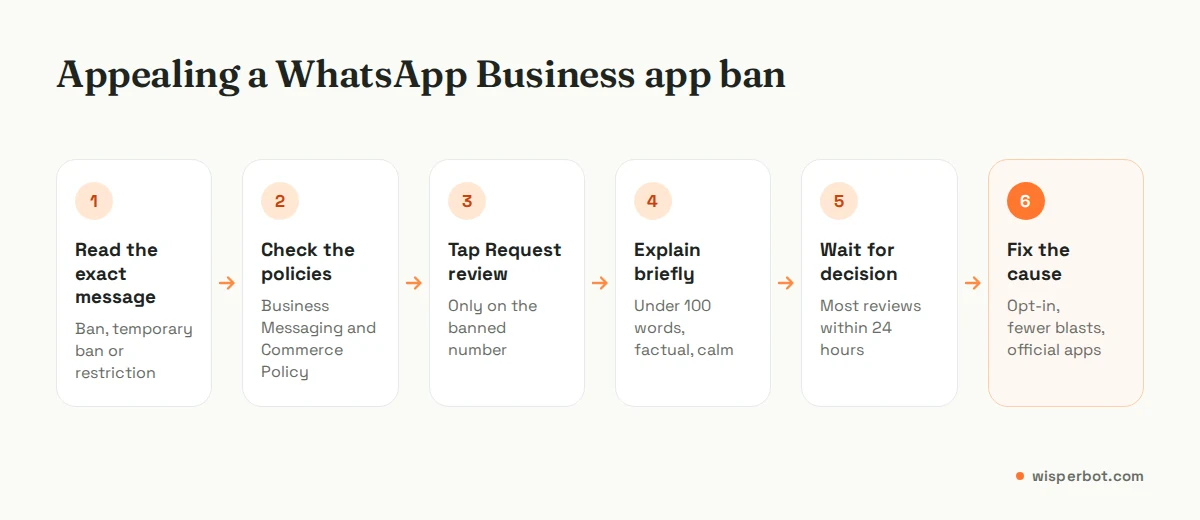
Open the WhatsApp Business app on the banned number and tap Request review. Write a short, factual explanation of how you use WhatsApp and why you think the ban is a mistake, then submit. WhatsApp sends a notification with the decision, which you can also see in the app. Each appeal covers one phone number.
- Appeal from the ban screen itself. The Request review option is in the app on the banned number, so do it before you start moving the SIM between phones.
- Read the policies before you write. The help centre links to the Business Messaging Policy and the Commerce Policy. If you broke one, fix the cause before appealing.
- Tap Request review and add your explanation.
- Wait for the in-app decision. Most come within a day. Checking the app is the only status page; there's no email to refresh and no number to ring.
- Don't chase it elsewhere. WhatsApp says contacting it outside the review process, or via another user's account, won't speed things up or change the decision.
What should you write in the review request?
Keep it under 100 words, factual and calm. Say what your business sells, how customers reach you (for example, they message after seeing your Facebook page), that you only reply to people who contact you or opted in, and what you've changed. Don't argue, don't threaten, and don't paste screenshots of customer chats.
An example for a Dhaka clothing page: "We are a small clothing shop in Mohammadpur. Customers message us from our Facebook page to ask prices and order. We don't send bulk messages and we only reply to customers who contact us. Last week we sent an Eid offer to our broadcast list; we've now limited it to customers who asked for offers. Please review our number."
Be honest in it. If you did send a big promotion, say so and say what changed. We'd rather read a plain admission than a paragraph about how important WhatsApp is to your family, and we suspect the reviewer would too.
WhatsApp Business API: restrictions, quality and appeals
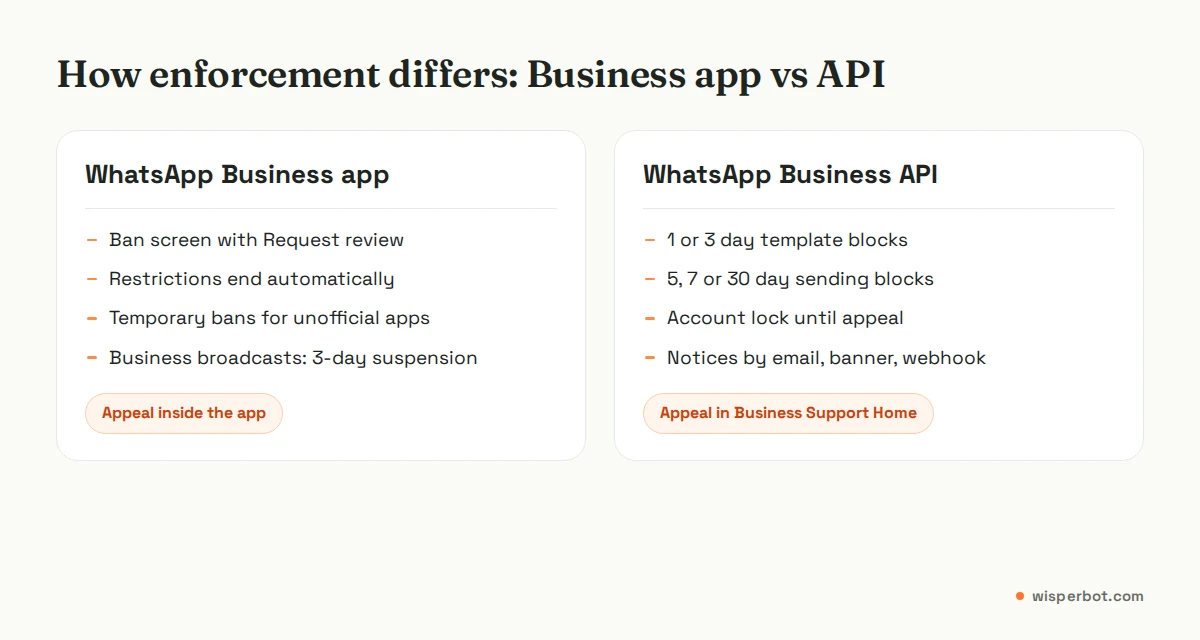
If your number runs on the WhatsApp Business Platform (the API, usually through a provider), enforcement works differently. Meta sends notices to Business Manager, shows a banner in WhatsApp Manager, emails all admins, and fires an account_update webhook that includes the restriction type and length.
| Enforcement | What you can't do | How it ends |
|---|---|---|
| 1 or 3 day block | Send marketing, utility or authentication templates; add phone numbers | Expires, or reversed on appeal |
| 5, 7 or 30 day block | Send any messages; add phone numbers | Expires, or reversed on appeal |
| Account lock | Send any messages, indefinitely | Only through an appeal |
| Permanent disablement | Use the platform at all | After repeated warnings and restrictions with no change |
| Immediate offboarding | Everything | Severe violations such as scams, child exploitation, terrorism or selling illegal drugs |
Meta says repeated violations lead to gradually longer restrictions. To appeal, open Business Support Home, select the WhatsApp Business Account, choose the violation, click Request Review, add your details and submit. Decisions typically take 24 to 48 hours and come back as either Unchanged or Reversed. Meta also notes that not all spam violations can be appealed.
Quality is the early warning. Meta rates templates high, medium or low based on user feedback and read rates, and pauses a low-quality template for 3 hours, then 6 hours, then disables it. Since October 2025, a falling phone number quality rating no longer lowers your messaging limit, but sustained negative feedback still leads to the blocks above. Our guide to WhatsApp broadcast and messaging limits explains the tiers, and how to get templates approved covers wording that keeps quality up.
What to do while you wait
A ban on the Thursday before Eid, with 80 orders half-confirmed in chats you can't open, is a sales emergency. Plan for it before it happens.
- Tell customers where to find you. Pin a post on your Facebook page and Instagram: "Our WhatsApp is under review. Message us here on Messenger for orders."
- Don't pay anyone to unban you. WhatsApp says third-party services can't ban or unban an account. Anyone selling a "guaranteed unban" for Tk 2,000 is selling nothing.
- Don't rush a second number into the same habits. If the cause was bulk messaging, a new SIM doing the same thing will likely meet the same fate.
- Expect to lose chat access for now. WhatsApp says you can't access chat history or backups while banned. Keep order details somewhere other than WhatsApp chats.
- Know that Meta Verified goes too. A banned Business app account automatically loses its Meta Verified subscription, with no refund if the ban was for a policy violation. More in our Meta Verified guide.
WhatsApp business account banned solution: a prevention checklist
The real solution is not getting banned twice. This is the checklist we'd run on the first of every month.
- Get opt-in in writing. A checkbox on your order form or a "Reply YES for offers" message. Keep a note of when each customer agreed.
- Make opting out easy and honour it. The policy requires you to respect stop requests on or off WhatsApp, including removing the person from your contacts.
- Send fewer promotions. One good offer a fortnight beats daily "new stock" blasts that get reported. If you're not sure whether a message is worth sending, it isn't.
- Use only official apps. The WhatsApp Business app, or the Business Platform through an official provider. Nothing modified, no WhatsApp Web bulk senders.
- Check your catalogue against the Commerce Policy. Especially health products, supplements, cosmetics with medical claims and anything age-restricted.
- Keep a human escalation path. On the Business Platform, the policy says automated replies must come with a prompt, clear way to reach a person, such as an in-chat agent transfer, phone or email.
- Keep a profile with real contact details. The policy asks for customer support contact information such as an email, website or phone number.
Where WisperBot fits
WisperBot, a reply-first inbox for WhatsApp, Instagram, Messenger and website chat, can't unban a number, and no tool can. What it can do is lower the risk. A Smart Bot replies to the people who message you, in seconds, instead of you blasting lists to win them back, and every conversation has an AI/Human switch so a person can take over, which fits the policy's escalation rule. Because Messenger, Instagram and web chat sit in the same shared inbox, customers can still reach you if WhatsApp goes quiet for a day. Our AI to human handoff playbook shows how to set that path up.
Frequently asked questions
How long does a WhatsApp Business ban review take?
WhatsApp's in-app ban message says most reviews are completed within 24 hours, and you get a WhatsApp notification with the decision. On the WhatsApp Business API, Meta says appeal decisions made through Business Support Home typically take 24 to 48 hours.
Can I get my banned WhatsApp Business number back?
Sometimes. If the ban screen shows Request review and WhatsApp finds it was a mistake, the number is unbanned and you verify it again to use it. If there is no review option, WhatsApp says the ban is final and can't be appealed, so that number won't come back.
Will I lose my WhatsApp chats if my business account is banned?
You can't open your chats or backups while the number is banned. WhatsApp says you can only access a backup after the phone number tied to it is unbanned. That is why order details and customer notes should also live somewhere outside your WhatsApp chat history.
Can someone pay to unban a WhatsApp Business account?
No. WhatsApp's help centre says third-party services can't ban or unban a WhatsApp Business account; only WhatsApp can. Paying an "unban agent" wastes money and may expose your account details. Use the Request review option in the app instead.
What counts as a WhatsApp business policy violation?
The main ones are messaging people without opt-in, ignoring opt-out requests, spam or misleading messages, impersonating another business, selling prohibited or restricted goods, and using unofficial apps or bulk-sending tools. The WhatsApp Business Messaging Policy and Meta's Commerce Policy list the full rules.
Sources
- WhatsApp Help Center: About account bans on the WhatsApp Business app
- WhatsApp Help Center: About account bans
- WhatsApp Help Center: About temporarily banned accounts
- WhatsApp Help Center: About restricted accounts
- WhatsApp Help Center: About unofficial apps
- WhatsApp Help Center: How to use WhatsApp responsibly
- WhatsApp Help Center: Can't send business broadcasts
- WhatsApp Business Messaging Policy (updated 23 September 2026)
- Meta for Developers: Policy enforcement on the WhatsApp Business Platform
- Meta for Developers: Template pausing
- Meta for Developers: Messaging limits changes (October 2025)
Last checked: 12 October 2026.