Setting Up After-Hours AI Replies: Start With the Night Shift
An away message says you're closed. A scheduled AI reply answers the question. Here's how to set one up for the night shift, test it and review it.
In this article
An after-hours auto reply should do more than say "we're closed". The best first step for most small sellers is to let an AI bot answer customer questions only during the hours nobody is watching the inbox, usually late night to mid-morning, using your own price list and policies, and hand anything it cannot answer to the team in the morning. Nights are the lowest-risk, highest-gain place to start, because the alternative is silence.
Key takeaways
- A classic away message tells the customer you are closed. An AI reply answers the question they actually asked, which is what keeps the sale alive overnight.
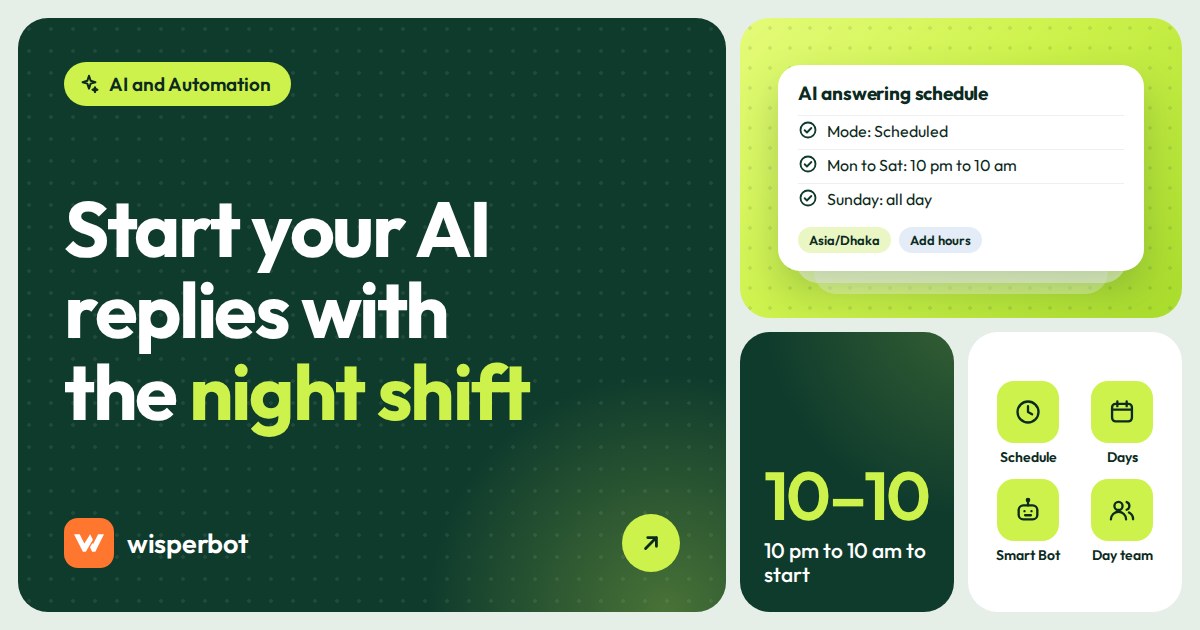
- Start with a schedule that covers only the hours nobody is reading the inbox, such as 10 pm to 10 am, not the whole day.
- In WisperBot, AI answering for your inbox channels is Off, Always on or Scheduled. Scheduled lets you pick a timezone and, for each day you tick, the exact time windows when the AI may answer.
- Use Strict mode for the night shift, so the bot answers only from your information and hands over when unsure.
- Spend ten minutes each morning reading what the bot said overnight. That review is what makes week two better than week one.
Why start with the night shift?
Because at night the comparison is easy. During the day a bot competes with a person who knows your stock; at 11:40 pm it competes with nothing. A careful bot that answers price and delivery questions from your own list beats silence, and any mistake it makes is there for you to read the next morning.
It also lets you learn safely. In week one you will find gaps in your price list, policies nobody wrote down and questions you never expected. Better to find them across 40 overnight conversations than 400 daytime ones.
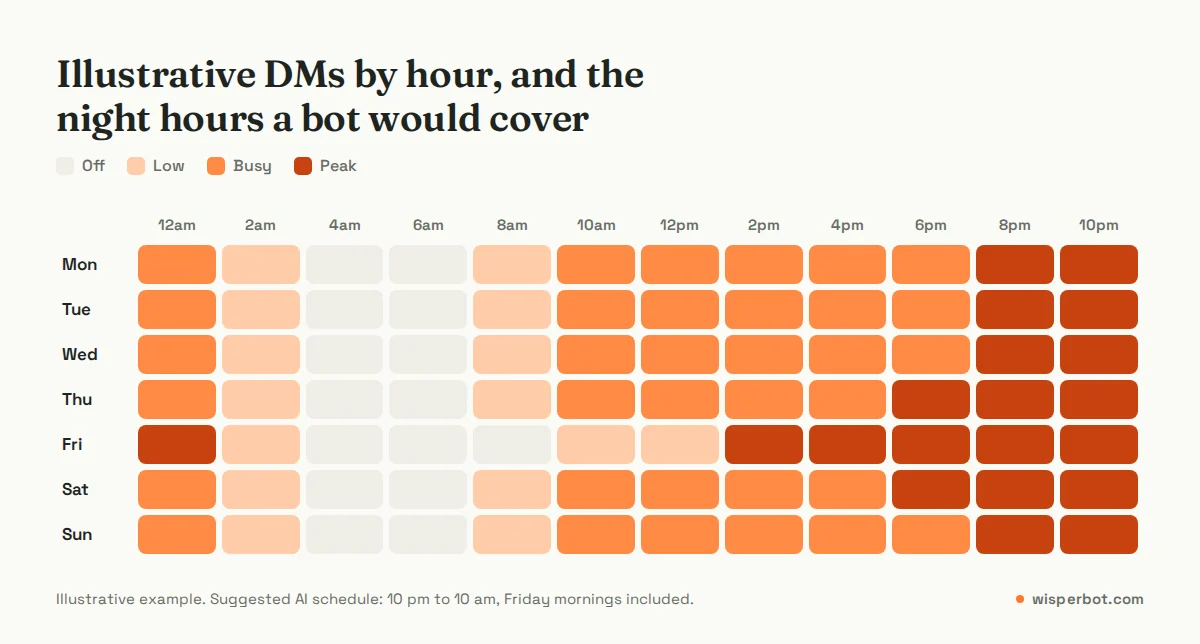
Example: a clothing page in Mirpur gets 120 DMs a day, and 35 of them arrive between 10 pm and 10 am. Today those 35 people wait until the owner wakes up. Some are still interested at 10 am. Some bought from another page at midnight. A night-only bot changes the experience for those 35, and leaves the 85 daytime conversations exactly as they are.
Illustrative example. Your split will differ; check your own inbox before you choose hours.
Away message or AI answer: what is the difference?
An away message is a fixed text sent when a message arrives outside business hours. WhatsApp's own description is that it responds automatically and tells customers when you will be back. An AI answer reads the customer's question and replies with the actual price, delivery charge or policy from your information, then hands over if it cannot.
| Question | Away message | AI reply (scheduled) | Night-shift person |
|---|---|---|---|
| What the customer gets at 11:40 pm | "We're closed, back at 10 am" | The price, sizes in stock and delivery charge | A full answer, including judgement calls |
| Handles "dam koto?" and "XL ache?" | No | Yes, if your price list covers it | Yes |
| Handles complaints and refunds | No | No, it should hand over | Yes |
| Cost | Free, for example in the WhatsApp Business app | A plan with enough AI replies for your night volume (Meta's WhatsApp fees, where they apply, are separate) | A salary, plus supervision |
| Risk of a wrong answer | None, it says nothing useful | Low with Strict mode and a good price list | Depends on training |
| Best for | Very low night volume | Steady night DMs about price, stock and delivery | High night volume with complex questions |
Our view: if you get fewer than five messages a night, an away message with your opening time is fine. Above that, the away message is costing you the people who wanted an answer, not a timetable.
How to set up after-hours AI replies in WisperBot
WisperBot, a reply-first inbox for WhatsApp, Instagram, Messenger and website chat, has one AI answering setting for your connected inbox channels (WhatsApp, Messenger and Instagram) with three answering modes: Off, Always on and Scheduled. Scheduled is the one you want for nights. Email has its own setting and website chat has its own switch, so you can treat them separately.
- Build or check your Smart Bot. The Smart Bot setup has six steps: Smart Bot, Business details, Knowledge, How it answers, Prices and live data, and Where it answers. At minimum, fill in business details (delivery areas, payment methods, return policy) and upload your price list.
- Add prices. In the Prices and live data step, add your price list as a CSV file or a Google Sheet link. The app asks for a CSV with a header row, up to 2 MB and 5,000 rows (from Excel, use Save as, then CSV). Our guide to writing a price list your chatbot can actually use covers the columns.
- Set "How it answers" to Strict. Strict answers only from your knowledge and sends anything else to your team. The app marks Balanced as recommended, and it is a good choice once your information is complete, but for the first nights we prefer Strict.
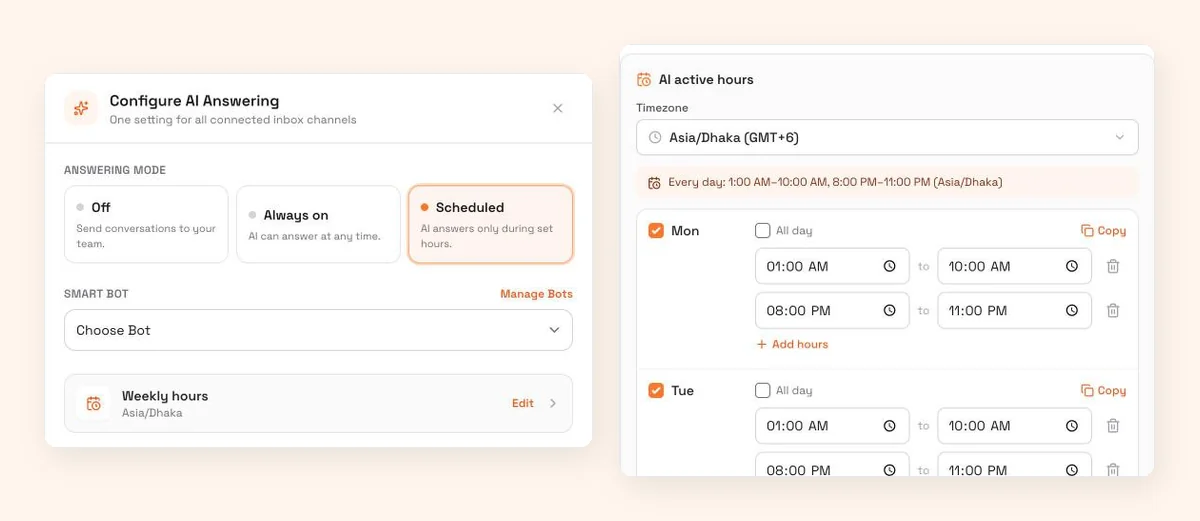
- Open Inbox Channel Setup and click Configure next to AI Answering. Under Answering mode, choose Scheduled ("AI answers only during set hours") and choose your Smart Bot.
- Set the answering schedule. Pick your timezone first. Then tick Monday and give it two windows: 12:00 AM to 10:00 AM, then click Add hours for a second window from 10:00 PM to the end of the day. Use Copy to copy Monday's hours to all days, and adjust any day that differs. The AI only answers on the days you tick, inside the windows you set.
- Decide on website chat and email separately. The website widget has its own switch, "Let a Smart Bot answer first", set to Permanent or Scheduled, and Scheduled uses AI active hours with the same day and window editor. We suggest leaving email off at first: email questions tend to be longer and less urgent than a 1 am DM.
- Test before the first night, using the test set below.
Which hours should count as after hours?
Use the hours when nobody is actually reading the inbox, not your official shop hours. If the owner replies until midnight from bed, drop the evening window and let the morning window start at midnight. If staff arrive at 10 am but only start replying at 11 after the morning dispatch, end the morning window at 11.
Fridays and holidays deserve their own thought. Each day has its own windows, so if your team starts after Jummah on Fridays, stretch Friday's morning window to 2:00 PM and the bot covers the morning. If nobody works at all on a day, tick it and set it to All day. Don't untick your day off by mistake: the AI only answers on the days you tick. Eid week will need its own plan.
Why does the timezone matter?
The schedule follows the timezone you choose, not the clock on whatever laptop set it up. If your shop is in Dhaka, pick Asia/Dhaka (UTC+6, no daylight saving). If your business is in Dubai, pick Asia/Dubai. Get this wrong and the bot starts its night shift at teatime.
If you sell into the UK, remember that UK clocks go back on the last Sunday of October (25 October in 2026) and forward on the last Sunday of March, so a schedule set in London time shifts against Dhaka by an hour twice a year.
What should the bot say when it cannot answer at 2 am?
It should say plainly that a person will reply in the morning, give the time, and ask for any detail the team will need. "I'll pass this to our team, they start at 10 am. Could you share your order number?" tells the customer where they stand, and the morning shift starts with the facts.
Be realistic about what will hand over. Complaints, refund requests and questions your price list does not cover should go to a person. So will some very short messages. A bot handles "dam koto apu, blue ta?" well when it has the product in context, but a lone "?" or "hm" under a photo carries too little to answer, and WisperBot may fall back to a human. That is the right behaviour at 2 am.
Write your handover line in the business details step, in the language your customers use. The bot replies in the customer's language, including mixed scripts such as Roman Bangla, so a customer who writes in Banglish gets Banglish back. Sellers in Pakistan see the same pattern, covered in our post on AI replies in Roman Urdu.
How do you test the night bot before switching it on?
Send it 15 to 20 real questions from your own inbox history, the kind that arrive after 10 pm, and check each answer against your price list. Include at least three it should not answer, such as a refund demand, so you can confirm it hands over instead of improvising. Fix the data, then test again.
A good test set for a fashion page looks like this:
- "Ei dress tar price koto?" (price, Roman Bangla)
- "XL size ache?" (stock)
- "Delivery charge Chittagong koto?" (outside Dhaka charge)
- "Cash on delivery hobe?" (payment policy)
- "How many days to Sylhet?" (delivery time, English)
- "Exchange korte parbo?" (return policy)
- "Amar order ta ekhono ashe nai, 5 din hoye gelo" (late order, should hand over)
- "Refund chai" (refund, should hand over)
- "?" (too short, may hand over)
If the bot gets a price wrong, the problem is almost always the sheet: a missing variant row, two products with similar names, or a sale price nobody removed. Our guide on Strict, Balanced and Flexible modes explains why Strict is the right starting point while you fix those gaps.
The ten-minute morning review
This is the part people skip, and it is the part that makes the bot better. Do it with your first cup of tea, before you start replying to new messages.
- Open conversations that came in overnight. Read the bot's answers as well as the handovers.
- Reply first to every conversation the bot handed over. These customers were promised a morning reply.
- For each wrong or weak answer, fix the source: add the missing row, correct the price, write the policy into business details.
- Label anything worth tracking, such as "bot gap" or "price missing", so you can count them at the end of the week.
- Check the weekly performance digest that arrives on Mondays, and look at median first response time in Reports to see the change.
After two or three weeks of this, the handover pile shrinks, and you will know whether to widen the hours. Our post on why Facebook sellers in Bangladesh lose orders at night covers what the night pattern looks like in more detail.
When should you widen the schedule?
Widen it when the morning review is boring: when most overnight answers are right and handovers are mostly complaints and genuine edge cases. Then click Add hours to cover the times the team is busiest, such as lunch or dispatch hours. Some sellers end up on Always on, with the team taking over conversations through the AI/Human switch.
Do not jump to Always on in week one. Daytime questions are more varied, customers expect more back-and-forth, and a bot that is still missing half your sizes will annoy people who could have had a person.
Where WisperBot fits
WisperBot's Scheduled AI answering does exactly the night-shift job described here: a Smart Bot answering from your own information during the hours you choose, a per-conversation AI/Human switch for the morning team, and Reports for median first response time. The Free plan includes 100 AI replies a month, which is enough to test nights on a small page; Starter at $15 a month includes 750. See pricing for the rest. If your nights are quiet, an away message may be all you need.
Frequently asked questions
What is the difference between an auto reply and an AI reply?
An auto reply sends the same fixed text to everyone, such as "We're closed, back at 10 am". An AI reply reads the specific question and answers it from your information, for example with the price and delivery charge, and hands over to a person when it cannot. Both can run on a schedule.
Is it OK to let a chatbot answer customers at night without supervision?
Yes, if it is set to answer only from your own information and to hand over when unsure, and if someone reviews the night's conversations each morning. Keep refunds, complaints and anything needing judgement with people. Start with a short schedule and widen it once the answers are consistently right.
What hours should an after-hours chatbot cover?
Cover the hours when nobody is reading the inbox, not your official opening hours. For many small online sellers that is roughly 10 pm or midnight to 10 am, plus Friday mornings or holidays. Look at when messages arrive and when your first reply actually goes out, then cover the gap.
Does replying the next morning break Meta's 24-hour rule?
No, as long as you reply within 24 hours of the customer's last message. WhatsApp's customer service window and Messenger's standard messaging window both run for 24 hours. A message at 11 pm answered at 10 am is well inside. Our explainer on the 24-hour messaging window covers the details.
How many AI replies does a night-only bot use?
Each answer the bot sends counts as one AI reply, and a typical conversation needs a few bot answers (our estimate: 2 to 4). Example: 30 overnight conversations a day at three answers each is about 2,700 AI replies a month, which fits the Growth plan's 3,000. Check your own volume before choosing a plan.
Sources
- WhatsApp Business: Business app features (away messages, greeting messages, quick replies), checked October 2026
- Meta for Developers: WhatsApp Business Platform pricing (24-hour customer service window), checked October 2026
- Meta for Developers: WhatsApp non-template (service) message pricing, checked 8 October 2026
- Meta for Developers: Messenger Platform policy overview (24-hour standard messaging window), checked October 2026
- GOV.UK: When do the clocks change, checked October 2026
Last checked: 8 October 2026.