First Response Time: What It Is, How to Measure It and the Target to Set
What first response time is, what counts as a reply, how to calculate it with a worked example, and why the median beats the average.
In this article
First response time (FRT) is the time between a customer's first message and the first real reply from your business, meaning a reply that answers or moves the conversation forward. Automatic "thanks for your message" greetings don't count. Measure it as a median across conversations, separately for each channel, and in both calendar hours and business hours. For WhatsApp, Instagram and Messenger, a good target is under a minute for the first useful answer and under five minutes for a person during opening hours.
Key takeaways
- Formula: first response time = time of first real reply minus time of the customer's first message.
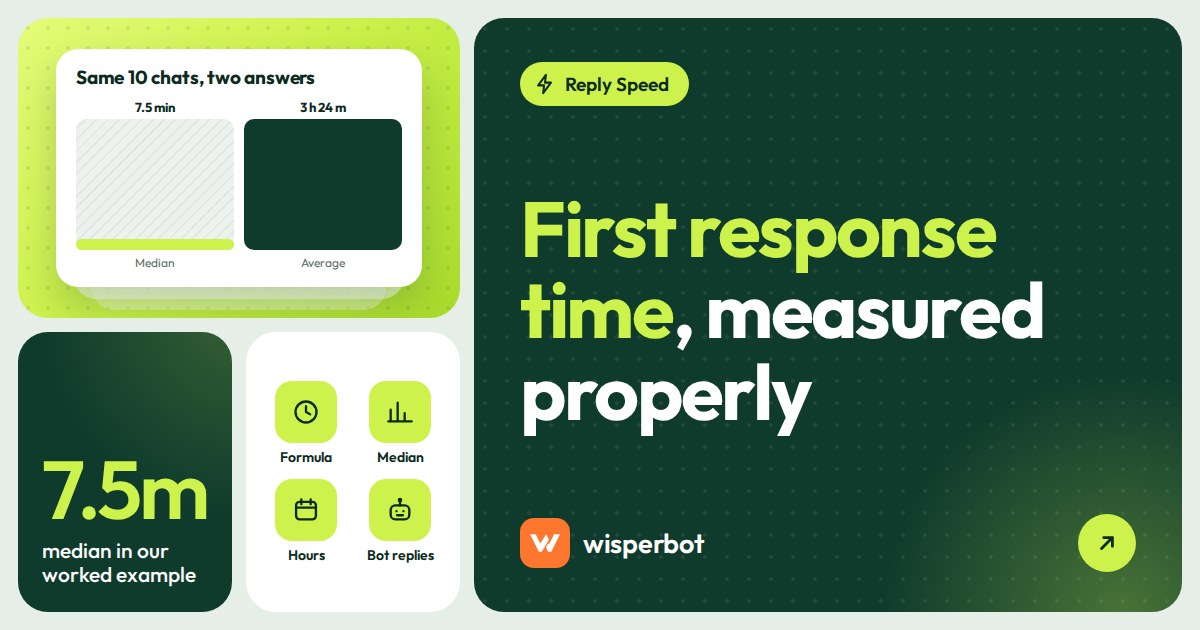
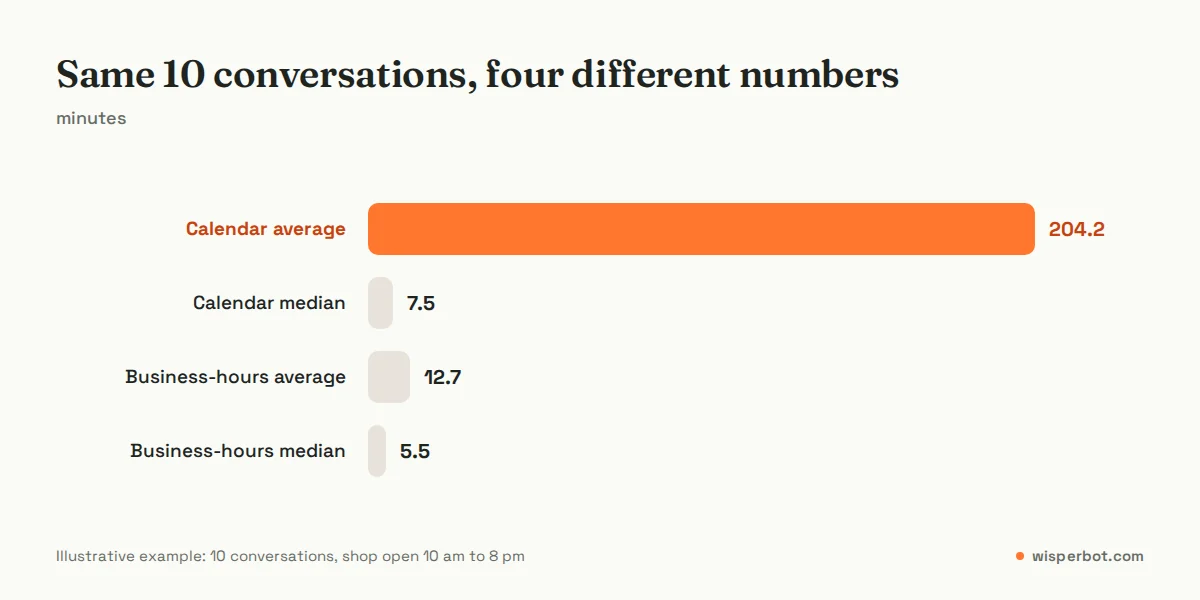
- Report the median, not the average. In our 10-conversation example the average is 3 hours 24 minutes and the median is 7.5 minutes.
- Calendar hours show what the customer felt; business hours show how the team performed. Track both.
- Helpdesk tools disagree on whether bot answers count. Intercom excludes them; we count a bot answer only if it actually answers.
- Conversations nobody replied to drop out of most FRT reports. Count them separately.
What is first response time?
First response time is how long a customer waits, from sending their first message to receiving the first reply that responds to what they asked. It's measured per conversation, then summarised across many conversations, usually as a median. It is different from resolution time, which runs until the customer's issue is fully sorted.
The formula is simple:
First response time = time of first real reply − time of customer's first message
So if a buyer in Chattogram sends "ei bag ta ki leather?" at 3:12 pm and you answer "Yes, genuine cow leather, Tk 2,200" at 3:16 pm, the first response time for that conversation is 4 minutes.
The hard parts are not the subtraction. They are deciding what counts as a reply, which clock to use, and how to summarise a week of conversations into one number that means something. Each of those choices can make your FRT look several times better or worse without a single customer being served differently.
What counts as a first response?
A first response is the first message that answers the question or clearly moves it forward. A human reply counts. A bot reply counts only if it gives a real answer from your own information. Greetings, away messages, "seen" ticks and reactions do not count, because the customer still doesn't have what they asked for.
Software vendors don't agree on this. Zendesk's first reply time stops at the first public agent comment, and automated actions generally don't stop it. Intercom's help centre says plainly that "Bot responses are not included in the 'First response time' metrics." Both are reasonable for a support team where bots mostly deflect. For a DM seller whose bot answers price and stock questions correctly, ignoring bot answers would hide the very improvement you paid for.
Our view is to keep two numbers: first reply by anyone (bot answers included, if they answer) and first human reply (for conversations a person needed to handle).
| Message sent to the customer | Counts as first response? | Why |
|---|---|---|
| "Thanks for messaging, we'll reply soon." | No | Acknowledges, answers nothing |
| Away message: "We're closed, back at 10 am" | No | Useful to know, but the question is still open |
| Bot: "The blue one is Tk 1,250, sizes S to XL in stock" | Yes | Answers the question from your own price list |
| Bot: "Let me connect you to a person" | No | Handover, not an answer; the clock keeps running for the human reply |
| Agent: "Checking with the warehouse, back to you by 4 pm" | Yes | A real update with a time commitment |
| A thumbs-up reaction or "seen" | No | No information given |
How do you calculate first response time?
Take a week of conversations and write down the time of the customer's first message and the time of your first real reply. Subtract to get each conversation's wait in minutes, then take the median of those values for each channel. Do it once with the clock always running and once with it paused outside opening hours.
- List every conversation started in the period, including the ones nobody has answered yet.
- For each one, note the time of the customer's first message and the time of the first message that counts as a response (see the table above).
- Calculate the wait in minutes on the calendar clock.
- Calculate it again on the business-hours clock, which only runs while you're open.
- Take the median of each column. In Google Sheets that's
=MEDIAN(E2:E11). - Count the conversations with no reply at all and report that number next to the median.
A worked example: 10 conversations
Example: a clothing page open 10 am to 8 pm. These ten conversations are illustrative, but the pattern is one we see constantly.
| # | Channel | Customer's first message | First real reply | Wait (calendar) | Wait (business hours) |
|---|---|---|---|---|---|
| 1 | 10:12 am | 10:15 am | 3 min | 3 min | |
| 2 | 11:30 am | 11:32 am | 2 min | 2 min | |
| 3 | Messenger | 1:05 pm | 1:47 pm | 42 min | 42 min |
| 4 | 3:20 pm | 3:24 pm | 4 min | 4 min | |
| 5 | Website chat | 4:00 pm | 4:01 pm | 1 min | 1 min |
| 6 | 5:55 pm | 6:01 pm | 6 min | 6 min | |
| 7 | 7:40 pm | 7:49 pm | 9 min | 9 min | |
| 8 | Messenger | 9:15 pm | 10:20 am next day | 13 h 5 min | 20 min |
| 9 | 11:40 pm | 10:35 am next day | 10 h 55 min | 35 min | |
| 10 | 1:10 am | 10:05 am | 8 h 55 min | 5 min | |
| Median | 7.5 min | 5.5 min | |||
| Average (mean) | 3 h 24 min | 12.7 min | |||
Look at what each number tells you. The business-hours median of 5.5 minutes says the team is quick when it's working. The calendar average of 3 hours 24 minutes says almost nothing, because three overnight waits drag it up and seven quick replies drag it down. Neither describes a real customer.
The calendar median of 7.5 minutes looks fine too. But three of ten buyers, the ones who messaged after 9 pm, waited between almost 9 and 13 hours. The median can't see them. That's why we pair the median with a tail measure, covered in median vs p90 reply time.
Should you measure in business hours or calendar hours?
Measure both, because they answer different questions. Calendar hours show how long the customer actually waited, which is what decides whether they buy. Business hours show whether the team is quick while on shift. If you only report business hours, every night-time message looks fine and the lost sales vanish from your reports.
Business-hours FRT is fair for judging staff. Nobody should be marked down because a buyer messaged at 1:10 am. But calendar FRT is the honest number for the business. Zendesk, for example, calculates both and leaves the choice to you; Intercom only applies office hours if you switch them on in workspace settings.
Write your opening hours and timezone down before you start. A team in Dhaka (UTC+6) serving buyers in Dubai (UTC+4) can easily end up with reports in UTC, and suddenly the "night" messages look like they arrived mid-afternoon.
What is a good first response time?
For WhatsApp, Instagram, Messenger and website chat, aim for a first useful reply in under a minute and a human reply within five minutes during opening hours. For email, the same business day is reasonable. These are our recommended targets, not an industry standard; no credible public benchmark exists for small sellers' DMs.
The reasoning behind those targets, and the research on what customers expect, is in our guide on how fast you should reply to customer messages. If you're writing targets into a team agreement, our customer service SLA template for small teams gives you a one-page format.
Common mistakes when measuring first response time
Most bad FRT numbers come from the method, not the team. These are the ones we see most often.
- Counting the auto-greeting. Turn on an instant "Hi, how can we help?" and FRT drops to zero seconds. Nothing changed for the buyer.
- Reporting the average. As the worked example shows, a few overnight waits make the average useless.
- Forgetting unanswered conversations. A conversation with no reply has no response time, so it quietly disappears from the median. Intercom's help centre, for instance, says a conversation needs "a pair of customer message + teammate message" to count. Ten ignored buyers can make your FRT look better.
- Mixing channels. Email replies in four hours and WhatsApp replies in four minutes average out to a number that fits neither.
- Restarting the clock on follow-ups. If a buyer sends three messages before you reply, the clock starts at the first, not the last.
- Ignoring timezone. Check which timezone your timestamps are in before you split by hour.
What a first response time timeline looks like
Here's one night-time conversation from start to finish, showing where first response time stops and where resolution time keeps running.
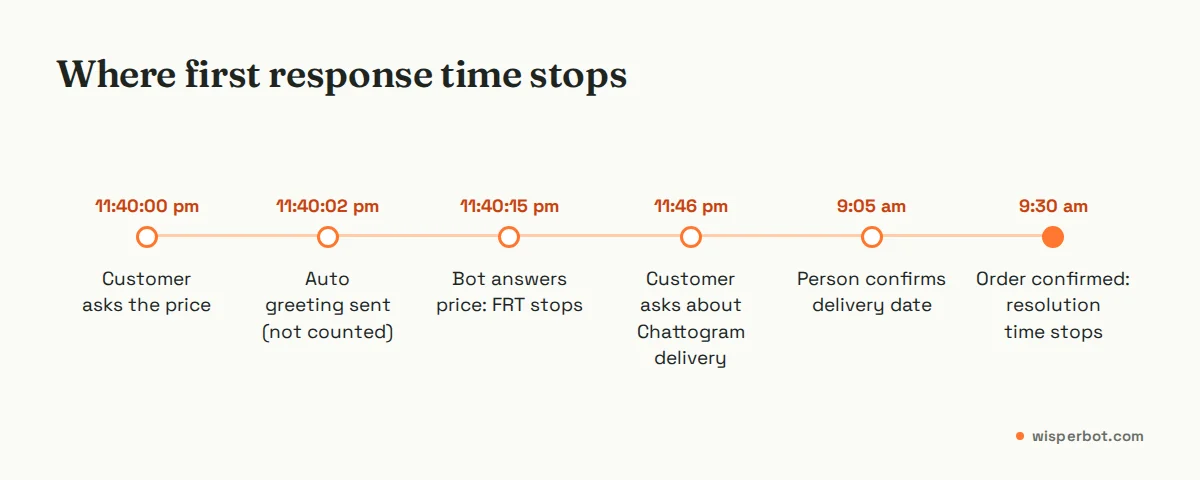
In this example the first response time is 15 seconds, because the bot answered the price question correctly. The first human reply came at 9:05 am, over nine hours later, and the resolution time was just under ten hours. All three numbers are true. Which one you report depends on what you're trying to fix.
Where WisperBot fits
WisperBot, a reply-first inbox for WhatsApp, Instagram, Messenger and website chat, collects every conversation in one place, so you aren't checking four apps to find out who is waiting. Its Reports show median first response time, median resolution time, an SLA trend and an agent leaderboard, and a performance digest email arrives every Monday. A Smart Bot can give the first answer in seconds from your own information and hand over to a person when needed. WisperBot doesn't show p90 yet, and it exports contacts rather than conversations or reply times, so if you want a tail figure you'll note times for a sample of conversations and calculate it yourself. See the inbox and reports for details.
Frequently asked questions
Is first response time the same as response time?
Not quite. First response time only measures the wait before the first real reply in a conversation. "Response time" or "average response time" often includes every reply in the conversation, including later back-and-forth. First response time matters most for chat because it decides whether the buyer stays or messages a competitor.
Does an auto-reply count towards first response time?
It shouldn't. An auto-reply that only says you'll be in touch doesn't answer anything, so counting it makes your numbers look better without helping the customer. A bot reply that correctly answers the question, such as price and stock from your own list, is a genuine response and can fairly be counted.
How do I calculate first response time in Google Sheets?
Put the customer's first message time in one column and your first real reply time in the next, both as date-times. Subtract them and multiply by 1440 to get minutes. Then use =MEDIAN() on that column. Calculate it separately for each channel, and count blank rows (unanswered conversations) on their own.
What is the difference between first response time and resolution time?
First response time stops at the first real reply. Resolution time keeps running until the customer's question or problem is fully dealt with, for example the order is confirmed or the refund is sent. A team can have a fast first response and a slow resolution, which usually means quick acknowledgements but slow follow-through.
How often should I check first response time?
Weekly is enough for most small teams. Check the median by channel, look at night-time messages separately and count unanswered conversations. Daily checks tend to swing wildly on small numbers. During a sale or ad campaign, look every day, because a slow afternoon can waste a whole day's ad spend.
Sources
- Zendesk Help: Understanding ticket reply time
- Zendesk Help: Calculating first reply time
- Intercom Help: See how quickly your team respond to and close conversations
- Google Docs Editors Help: MEDIAN function
Last checked: 8 October 2026.