Helpdesk, Shared Inbox or Chatbot: What Does a Small Business Actually Need?
Helpdesks track cases, shared inboxes stop teams clashing, chatbots cover repeats and nights. A decision matrix with 2026 prices for small teams.
In this article
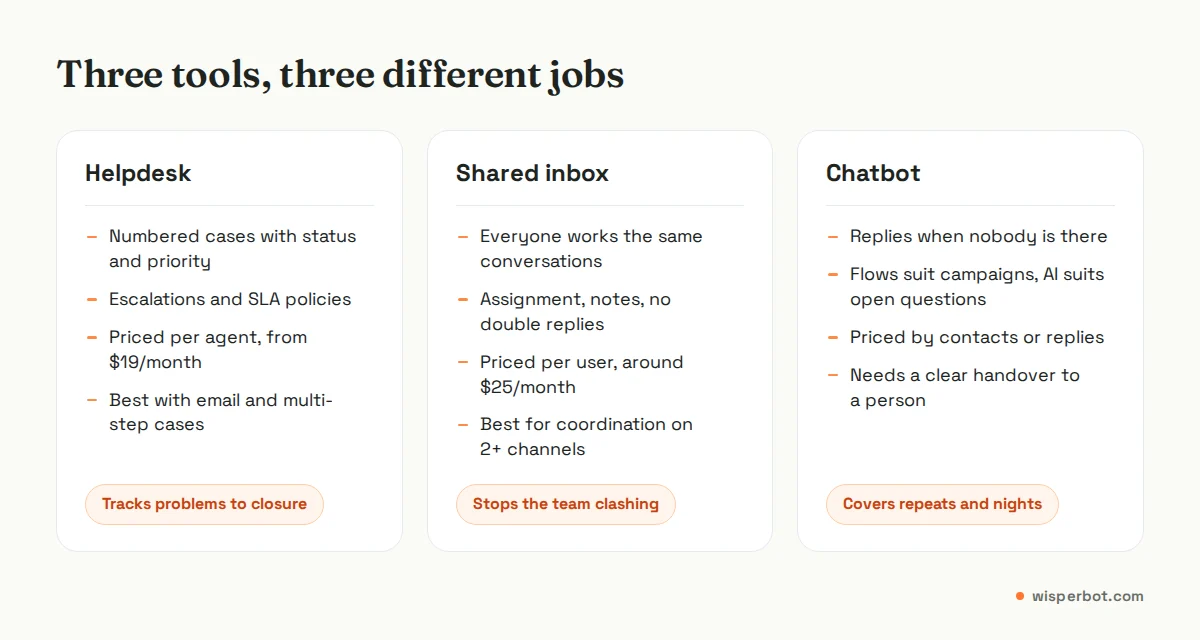
A helpdesk tracks customer problems as numbered cases until they are closed; a shared inbox lets several people work the same conversations without clashing; a chatbot answers on its own when nobody is there. Most small businesses selling through DMs need a shared inbox with an AI first reply, while email-heavy teams with complex cases need a helpdesk. If you get fewer than about 20 messages a day and answer them yourself, you may not need any of the three yet.
Key takeaways
- Choose by where your messages arrive and how many people answer them, not by feature lists.
- Helpdesks such as Zendesk and Freshdesk are priced per agent (from $19 per agent a month on yearly billing, checked 8 October 2026) and suit email and formal escalations.
- Shared inboxes such as Front and Help Scout start around $25 per user a month and solve "who is replying to this?"
- Chatbot builders such as ManyChat are priced by contacts and shine at campaigns, less at open questions.
- A one-person shop can start with the free WhatsApp Business app and saved replies, and move up when evenings get busy.
Three tools, three different jobs
The names get used loosely, so here is how we use them in this guide.
Helpdesk: software that turns each customer request into a case with a reference number, a status (open, pending, solved), a priority and an owner. It is built for tracking and accountability. Many include a self-service help centre, case escalation and SLA policies (a service level agreement, meaning a written promise about how fast you will reply or resolve).
Shared inbox: one inbox that several people can work at once, with assignment, internal notes and "someone else is typing" style collision warnings. It looks like email or chat, not like a case system. It answers the most common small-team question: did anyone reply to her yet?
Chatbot: software that replies without a person. Older bots follow flows you draw in advance (buttons, keywords, menus). Newer AI bots read the question and answer from information you give them. On its own, a chatbot often has a weak handover to a human.
The useful question isn't which one is best. It is which job is costing you customers right now.
Do you need any software at all?
Possibly not. If you get fewer than about 20 customer messages a day, mostly on one channel, and you can reply within a few minutes during the hours customers write, the free WhatsApp Business app with quick replies, labels and an away message may be enough. Buy software when you start missing messages, not before.
We say this as a company that sells software. A boutique in Dhanmondi taking 12 WhatsApp enquiries a day does not need a helpdesk billed per agent. It needs the owner to save ten good replies ("Price 1,850 taka, delivery 80 inside Dhaka, 2 to 3 days") and to stop answering from three different phones. Our list of saved replies for online sellers is a decent place to start.
Meta's Play Store listing for the WhatsApp Business app (checked 8 October 2026) says the app is free to download, offers quick replies, away messages and labels, and lets one account run on up to five web or mobile devices. That stretches surprisingly far for one or two people.
The warning signs that you have outgrown it are specific:
- Messages from Instagram and Messenger sit unread because you live in WhatsApp.
- Two people reply to the same customer with different prices.
- Your busiest hour for DMs is after 10 pm, and you are asleep.
- You can't say, even roughly, how long people wait for a first reply.
What is the difference between a helpdesk and a shared inbox?
A helpdesk organises work around cases: each request gets a number, a status and a priority, and the system tracks it until it is solved. A shared inbox organises work around conversations: everyone sees the same messages, assigns them and leaves notes, but there is less process around each one. Helpdesks add structure; shared inboxes add speed and visibility.
In practice the line has blurred. Help Scout markets itself as help desk software but looks and feels like a shared email inbox, and Zendesk now includes AI agents in every plan. So read the feature list for the tier you would actually buy, not the category label on the homepage.
A helpdesk earns its price when you have repeat, multi-step problems: a refund that needs finance to approve it, a warranty claim that waits on a supplier, a B2B client with a contract that promises a four-hour response. A shared inbox earns its price when the problem is coordination: three people, four channels, one list.
Where does a chatbot fit?
A chatbot fits wherever the same questions arrive again and again, or wherever messages arrive when nobody is working. Price, size, stock, delivery charge, opening hours and "how do I book?" make up a large share of DMs for most sellers. A bot covers those instantly and frees people for the conversations that need judgement.
The type of bot matters. Flow builders such as ManyChat are excellent for campaigns: a giveaway, a comment that triggers a DM, a lead magnet with buttons. They are weaker when a customer writes "blue ta L size e ache? ar Chattogram e delivery koto din?" because nobody drew a flow for that exact mix of questions.
AI bots that answer from your own price list and policies handle open questions better, but they need guardrails: they should answer only from your information and hand over when unsure. Meta's 2026 State of Business Messaging report (Kantar, 22 markets, fieldwork April to September 2025) found 67.7% of consumers find a response from an AI chatbot helpful. That is a majority, not everyone, which is why the handover to a person matters as much as the bot.
How much does each option cost for a three-person team?
For three people on yearly billing, entry-level helpdesk plans from Zendesk and Freshdesk come to about $57 a month, shared inboxes like Front and Help Scout about $75, and ManyChat's Pro plan $29 a month for up to three users. Prices below were read from each vendor's pricing page on 8 October 2026.
| Option | Type | How it is priced | Entry price | Rough monthly cost, 3 people |
|---|---|---|---|---|
| WhatsApp Business app | Phone app | Free to download (paid extras exist) | $0 | $0, but one WhatsApp number only |
| Zendesk Support Team | Helpdesk | Per agent | $19/agent/month yearly, $25 monthly | $57 yearly billing |
| Freshdesk Growth | Helpdesk | Per agent | $19/agent/month yearly | $57 yearly billing |
| Help Scout Standard | Shared inbox / help desk | Per user (free plan: 5 users, 100 contacts a month) | $25/user/month | $75 |
| Front Starter | Shared inbox | Per seat, up to 10 seats | $25/seat/month | $75 |
| ManyChat Pro | Chatbot / flow builder | Per plan, by active contacts | $29/month, 2,500 active contacts, 3 users | $29 plus extra contacts |
| WisperBot Starter / Growth | Shared inbox with AI replies | Per plan, by AI replies | $15 (750 AI replies) / $39 (3,000 AI replies) | $15 to $39; check team limits on the pricing page |
Three cautions about that table. First, AI often costs extra on helpdesks: Zendesk charges per automated resolution beyond a small allowance, and Help Scout's AI Answers is $0.75 per resolution. Second, Meta's own WhatsApp message fees, where they apply, are separate from any of these plans. Third, the cheapest tier is not always the one with WhatsApp or Instagram included, so check channels before you compare prices.
A decision matrix by team size and channel mix
Find the row that sounds most like your business today, not the business you hope to be in two years. You can move up later; moving down after a yearly contract is harder.
| Your situation | Main problem | What to use | What to skip for now |
|---|---|---|---|
| 1 person, under 20 messages a day, mostly WhatsApp | Retyping the same answers | WhatsApp Business app, quick replies, labels | Any paid software |
| 1 to 2 people, DMs on 3+ channels, busy evenings | Missed and late messages | Shared inbox with an AI first reply | Helpdesk |
| 3 to 10 people, mostly DMs, repeat questions | Coordination plus volume | Shared inbox, AI first reply, labels and assignment | Case numbers and customer portals |
| 3 to 10 people, mostly email, multi-step cases | Tracking cases to closure | Helpdesk | Flow-based chatbot |
| Marketing-led brand, comment and giveaway campaigns | Turning comments into leads | Flow builder, plus an inbox for the replies | Helpdesk |
| B2B with contracts promising response times | Proving you met them | Helpdesk with SLA policies | Bot answering contract questions alone |
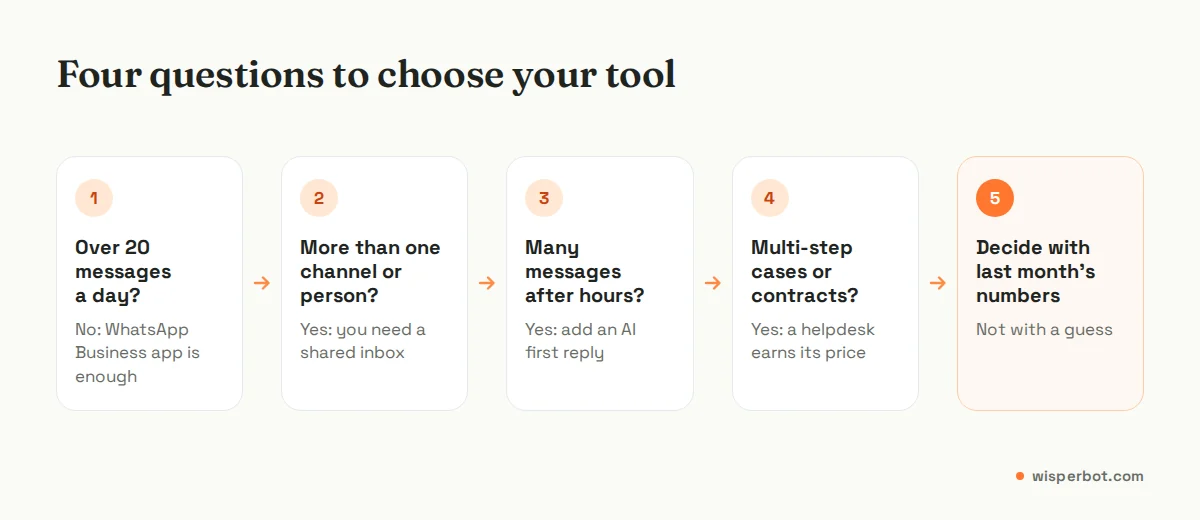
Before you trial anything, count three things from the last 30 days: messages per day by channel, the share that arrived outside your working hours, and how many conversations needed more than one person. Those three numbers make most of the decision for you. Our buyer's checklist for messaging platforms covers the questions to ask vendors once you have them.
Common mistakes when choosing
Buying the enterprise tool first. A three-person Instagram shop does not need customer portals, case merging and approval workflows. It needs replies.
Choosing a bot without a handover. If the customer can't reach a person when the bot is stuck, you have built a polite wall.
Counting channels instead of replies. A tool that connects eight channels but leaves Instagram DMs unread overnight hasn't solved anything. The number that matters is how long customers wait for a first useful answer, which we explain in what a reply-first inbox is.
Ignoring the phone. Owners of small shops answer from their phones between other jobs. If the tool's mobile app is an afterthought, you'll drift back to WhatsApp on your personal handset within a fortnight.
Where WisperBot fits
WisperBot, a reply-first inbox for WhatsApp, Instagram, Messenger and website chat, sits in the "shared inbox with an AI first reply" rows of the matrix. It brings those channels and email into one inbox, answers from your own price list and policies, gives your team Quick Replies to insert with a /shortcut for the answers people still type, and lets a person take over any conversation with an AI/Human switch, on the web or in the iOS and Android agent app. It is not a full helpdesk: if you need case numbers, a public help centre or contract SLA policies, pick a helpdesk. Plans start free (100 AI replies a month) and are priced per plan rather than per seat (check team member limits); see WisperBot pricing and the inbox.
Frequently asked questions
Is a shared inbox the same as a helpdesk?
Not quite. Both let a team answer customers together, but a helpdesk adds case numbers, statuses, priorities and usually escalation rules and SLA policies. A shared inbox stays closer to a normal email or chat view. Some products sit in between, so compare the features on the tier you would buy.
Can a chatbot replace a helpdesk?
No. A chatbot answers questions; a helpdesk tracks problems to closure. A bot can take repeat questions off a helpdesk team, but refunds, complaints and multi-step cases still need a system that records who owns them and where they stand.
What is the cheapest customer service software for a small business?
The cheapest is the free WhatsApp Business app, which covers quick replies, labels and away messages for one number. Free tiers also exist from Help Scout (5 users, 100 contacts a month), ManyChat (25 active contacts) and WisperBot (100 AI replies a month). Compare what the free tier excludes, not just the price.
When should a small business move from WhatsApp Business app to software?
Move when you start missing messages: more than one person needs to reply, messages arrive on several channels, or many arrive after hours. If none of those is true, the free app and good saved replies are enough, and paying for software will not make you faster.
Do I need a helpdesk if I sell on Instagram?
Usually not. Instagram sellers mostly face fast, repeat questions about price, size, stock and delivery. A shared inbox with an AI first reply handles that better than a case system. Consider a helpdesk only if you handle many multi-step problems such as warranty claims.
Sources
- Zendesk pricing (Support Team, Suite plans, automated resolutions)
- Freshdesk pricing
- Help Scout pricing (Free, Standard, AI Answers)
- Front pricing
- ManyChat pricing
- WhatsApp Business app listing on Google Play
- Meta / Kantar: State of Business Messaging (2026 edition)
- Meta for Developers: Pricing on the WhatsApp Business Platform
Last checked: 8 October 2026.