Free Live Chat for Your Website: What 'Free' Really Includes in 2026
Five free live chat plans compared from each vendor's own pricing page: seats, AI answers, branding, channels and what the first upgrade costs.
In this article
Your web developer has just asked which chat widget to add before the site goes live on Sunday, and "the free one" is the obvious answer. A free live chat for website visitors costs nothing to install, but every free plan stops somewhere different. On their own pricing pages, as listed on 12 October 2026, Tawk.to keeps live chat free and charges $29 a month to remove its branding, Tidio's free plan covers 50 billable conversations, HubSpot's free live chat carries HubSpot branding, Crisp's free plan has two seats and no AI credits, and WisperBot's Free plan includes 100 AI replies a month. We make WisperBot, so read our section with that in mind; we've held it to the same checks as the others.
Key takeaways
- All five tools below have a $0 plan you can keep, rather than a time-limited trial, as listed on 12 October 2026.
- Branding is the most common catch: Tawk.to, Tidio, HubSpot and WisperBot all show their own name on the free widget.
- Free AI is thin everywhere: Tidio gives 50 Lyro conversations once, Crisp includes no AI credits, WisperBot gives 100 AI replies a month.
- The real cost of free live chat is staff time. A widget nobody answers at 11 pm is just a slower contact form.
- Check channels before you install. Only some free plans put WhatsApp or Instagram in the same inbox as your website chat.
What does a free live chat for website actually include?
Usually a chat widget, a shared inbox to answer from, a mobile app and a few seats. What it rarely includes is AI that answers on its own, removal of the vendor's logo, or WhatsApp and Instagram in the same inbox. Those are what vendors charge for first, so check them before you install anything.
That's a fair trade. The point is to know which limit you'll hit first. A coaching centre in Dhanmondi that gets 15 chats a week will live happily on a free plan for years. A clothing shop whose Facebook ads push 60 visitors an hour to its site will hit the edges in its first sale week, probably on the Friday night.
We used only each vendor's own pricing and product pages, fetched on 12 October 2026. Where a page didn't say something, we've written "not stated". Some pages show "$" without naming a currency.
Free live chat for website: five free plans compared
| Tool | Free plan (as listed 12 Oct 2026) | Seats on free | AI on free | Branding on free widget | Channels beyond web chat on free |
|---|---|---|---|---|---|
| Tawk.to | Live chat, knowledge base and ticketing free; "free for life" if you keep the branding | Not stated (the page criticises per-seat pricing) | AI Assist has a "forever-free plan for sites with limited chat volume"; paid from $29/month | Yes; removal $29/month | Homepage shows an inbox with WhatsApp, Messenger, Telegram, SMS and email; pricing page labels messaging beta |
| Tidio | $0/month, 50 billable conversations | 10 | First 50 Lyro AI conversations free (lifetime) | Yes ("No Tidio branding" not on Free) | Messenger, Instagram, WhatsApp and email marked on every plan |
| HubSpot | Live chat and chatbot builder free, no card needed | 2 users on the free tools | Not described for free live chat | Yes ("HubSpot branding included on ... live chat") | Not mentioned on the live chat page |
| Crisp | $0 "Forever" | 2 | No AI credits included | White labelling listed on Plus ($295/month) | Chat widget and contact form; WhatsApp and Instagram from Essentials |
| WisperBot (ours) | $0, free forever | 1 team member | 100 AI replies a month, 1 Smart Bot trained on your website | Yes ("WisperBot branding on widget") | 1 WhatsApp number; Instagram, Messenger and Telegram from Starter |
Tawk.to
Tawk.to is the best-known free live chat for a reason. Its pricing page says live chat, a hosted knowledge base and ticketing are all free, and that the product is "free for life" if you leave the small "Powered by tawk.to" line in place. Removing it costs $29 a month. AI Assist, its chatbot, has a forever-free plan "for sites with limited chat volume" and paid use "from as little as $29/month". It also sells trained human agents to answer your chats for $1 an hour.
Where it's stronger: no per-seat charge on the free product and a free help centre. Watch for: its homepage shows WhatsApp, Messenger and Telegram in the inbox, but the pricing page still labels messaging as beta, and Instagram isn't listed. We compare it with six other tools in our Tawk.to alternatives guide.
Tidio
Tidio's free plan is generous on seats (10) and channels: its comparison table marks live chat, Messenger, Instagram, WhatsApp and email on every plan, Free included. The limit is volume. Free covers 50 billable conversations, and Tidio counts a conversation as billable once a human agent replies in it. Lyro, its AI agent, gives you your first 50 conversations free, once, for the life of the account. After that, Lyro is an add-on listed from $32.50 a month.
Where it's stronger: the widest channel list on a free plan in this group, plus Shopify tools. Watch for: operating hours and the live visitors list start on Starter, listed at $24.17 a month on yearly billing. More in our Tidio alternatives post.
HubSpot
HubSpot's free live chat sits inside its free CRM. You get the widget, a chatbot builder that can qualify leads and book meetings, and a shared inbox, with no card required. Every chat lands on a contact record, which is the real reason to choose it. The Starter comparison lists 2 users on the free tools and says "HubSpot branding included on emails, forms, live chat, meeting links". Starter removes the branding and is listed at $10 per seat a month billed monthly, or $7 billed yearly, both shown as limited-time prices for new customers, down from $20.
Where it's stronger: nothing else here gives you a free CRM behind the chat. Watch for: it's a sales and marketing system first, and the live chat page doesn't mention WhatsApp or Instagram.
Crisp
Crisp's Free plan is listed at $0 "Forever" with 2 agents, 100 customer profiles, the website chat widget, a contact form, a shared inbox and mobile apps. It includes no AI credits. Mini, at $45 a month, adds a shared email inbox and $5 of AI credits, which Crisp estimates at around 90 automated conversations. WhatsApp and Instagram DMs arrive on Essentials at $95 a month. Every paid plan has a 14-day trial.
Where it's stronger: the clearest AI maths of the group. Watch for: 100 customer profiles fills up fast on a busy shop site.
WisperBot (our product)
WisperBot, a reply-first inbox for WhatsApp, Instagram, Messenger and website chat, has a Free plan with 1 team member, 1 WhatsApp number plus website chat, 1 Smart Bot trained on your website, 100 AI replies a month and the mobile agent app. Each answer the bot sends uses one AI reply, and a typical conversation needs a few (our estimate: 2 to 4), so 100 replies covers roughly 25 to 50 conversations a month. The widget shows WisperBot branding on Free; Growth ($39 a month) removes it.
Where others are stronger: Tidio gives you 10 seats for free, Tawk.to doesn't charge per seat and adds a free knowledge base, and HubSpot gives you a CRM. Our Free plan is one person, one bot.
Is a free website chatbot actually free?
Partly. The builder is usually free, but the answers aren't. Tidio's free Lyro conversations run out after 50, Crisp's free plan has no AI credits, and Tawk.to's free AI tier is for "limited chat volume". WisperBot gives 100 AI replies a month. Beyond that, every vendor charges, either as an add-on or by moving you up a plan.
The useful question is what happens when the allowance runs out on a Friday night. Usually the widget falls back to a "leave your email" form: a contact form wearing a chat bubble. A customer asking "delivery to Chattogram koto din?" at 11:40 pm wants an answer, not a promise.
So work out your number first: last month's website chats times the share that arrived outside working hours. If that's 300 and the free tier is 50, you're choosing a trial, not a free plan.
How much does it cost to leave the free tier?
As listed on 12 October 2026, the first paid step ranges from $10 a month (one HubSpot Starter seat, at a limited-time price) to $45 a month (Crisp Mini). Tawk.to's first common paid item is branding removal at $29, Tidio Starter is $24.17 on yearly billing, and WisperBot Starter is $15. They buy different things.
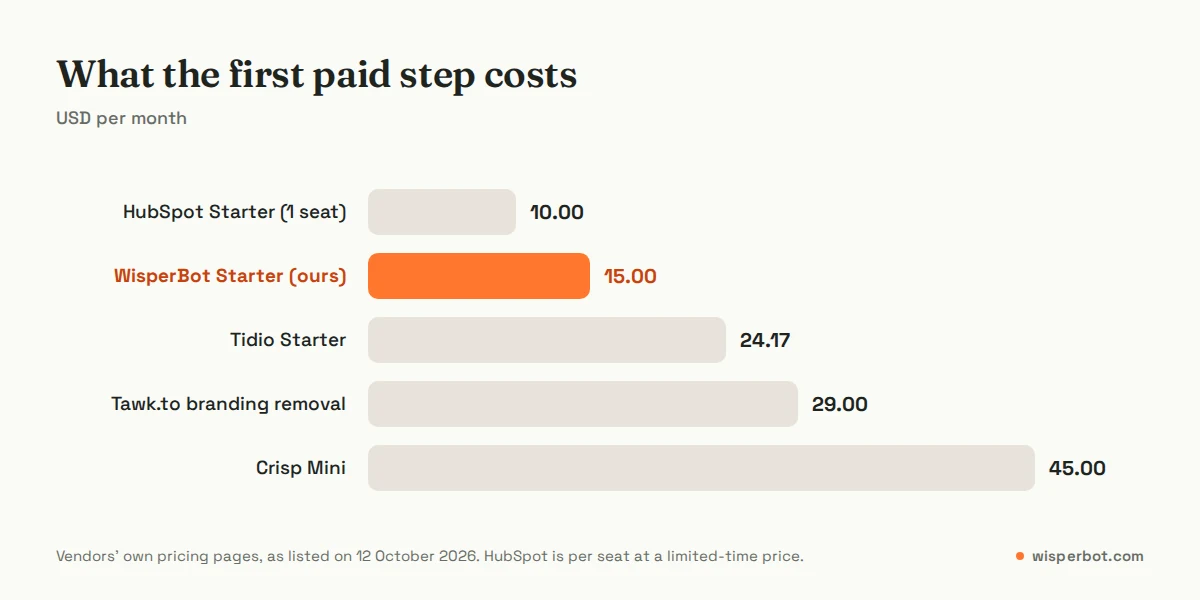
HubSpot's $10 is per seat, so three agents cost $30. Tidio's $24.17 is the yearly-billing rate (its toggle gives two months free, which puts monthly billing at about $29), and Starter still carries Tidio branding; the removal add-on (16.67 USD a month) is listed on Growth. Tawk.to's $29 removes the logo but adds no AI. Our $15 Starter adds Instagram, Messenger, Telegram, 3 team members and 750 AI replies, but keeps our branding until Growth.
What does "free" cost you in time?
More than most people budget. Free live chat only replaces a phone call if someone answers it. A widget that says "online" while nobody's watching teaches visitors to leave. Free software moves the cost from a subscription to your evenings, so count the hours a person needs to cover the chat before you count the dollars saved.
An illustrative example: a shop in Mirpur gets 40 website chats a day at about 4 minutes each. That's 160 minutes of someone's attention, in small interruptions. If 15 of those chats arrive after 10 pm and wait until morning, a few of those customers will have bought elsewhere. Tawk.to's pricing page makes the same argument, which is why it sells human agents by the hour.
Our view: let AI answer the repeat questions (price, size, delivery, opening hours) and have a person handle the rest during the day. Start with nights. Switch the bot on for after-hours chats in week one, read every answer it gives, and only widen its hours once it stops surprising you. Our guide to setting up after-hours AI replies walks through that.
Which free chat widget for website visitors should you choose?
Choose by your biggest constraint, not the longest feature list. Many agents and no AI: Tawk.to. WhatsApp and Instagram on a free plan, with modest volume: Tidio. A CRM behind every chat: HubSpot. A tidy widget you expect to pay for soon: Crisp. A small team that wants AI to answer first: WisperBot, and yes, we built it.
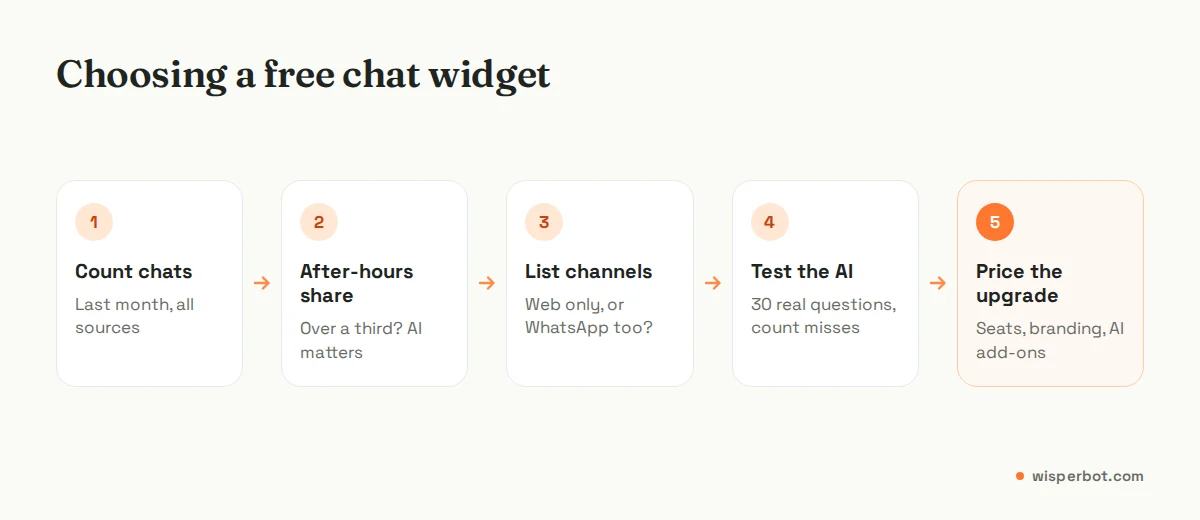
- Count last month's chats. Include contact-form messages from the same customers.
- Work out the after-hours share. If more than a third arrive when nobody's online, AI matters more than seats.
- List the channels customers actually use. If half your questions come through WhatsApp, a web-only free plan means two inboxes.
- Test the AI with 30 real questions. Copy them from your inbox, typos and all, and count wrong or vague answers.
- Price the first upgrade. Write down what you'll pay the day you outgrow free, including seats and branding removal.
Then set the widget up properly, which almost nobody does on day one. Our website chat widget best practices cover placement, greetings and what to show when you're offline.
Where WisperBot fits
WisperBot suits a small business that wants the first reply to come in seconds, from its own information, at any hour, with a person taking over when needed. The Free plan is a real way to test that on your website and one WhatsApp number. If you need five agents answering by hand, a free help centre or a CRM, Tawk.to, Tidio or HubSpot will serve you better. Plans and limits are on our pricing page, and the Smart Bot page explains how answers are grounded in your data.
Frequently asked questions
Is Tawk.to really free?
Yes, for live chat, its knowledge base and ticketing, according to its pricing page on 12 October 2026. It stays free as long as you keep the "Powered by tawk.to" branding; removal costs $29 a month. AI Assist has a free tier for limited chat volume, and paid AI starts at $29 a month.
What is the best free live chat for a small business website?
It depends on your constraint. Tawk.to suits teams who want many agents at no cost, Tidio suits shops that want social channels on a free plan, HubSpot suits businesses that want a CRM, and WisperBot suits small teams that want AI to answer first. Test two with your real questions before deciding.
Can I get live chat for website free without branding?
Not on these five free plans as listed on 12 October 2026. Tawk.to charges $29 a month for branding removal, Tidio lists removal as an add-on on Growth, HubSpot removes it on Starter, Crisp lists white labelling on Plus, and WisperBot removes it on Growth at $39 a month.
Is there a free website chatbot with AI?
Yes, with limits. Tidio's free plan includes your first 50 Lyro AI conversations once, Tawk.to's AI Assist has a free tier for low volume, and WisperBot's Free plan includes 100 AI replies a month from a Smart Bot trained on your website. Crisp's free plan includes no AI credits.
Can a free live chat widget also handle WhatsApp?
Some can. Tidio's comparison table marks WhatsApp on its Free plan, and WisperBot's Free plan includes one WhatsApp number alongside website chat. Crisp adds WhatsApp from Essentials at $95 a month. Meta's WhatsApp fees, where they apply, are separate from any chat tool's plan.
Sources
- tawk.to pricing page, as listed on 12 October 2026
- Tidio pricing page, as listed on 12 October 2026
- HubSpot free live chat page and HubSpot Starter Customer Platform pricing, as listed on 12 October 2026
- Crisp pricing page, as listed on 12 October 2026
- WisperBot pricing page
Last checked: 12 October 2026.